
3 API Calls to Deliver ATS Assessment Scores for HR and Engineering

Prefer a native assessment API when your applicant tracking system offers one. When it does not, fall back to a system-of-record integration or a unified Assessment API. Either way, plan for three core actions: listing available test packages, triggering an assessment for a candidate, and syncing results back through webhooks. Richer features or access to the integration at all may sit behind a paid or partner tier.
TL;DR:
- Native assessment APIs provide the best recruiter experience by allowing filtering and ranking of candidates based on structured scores within the ATS.
- When no assessment API is available, fallback integrations attach results as notes or files, which limits the ability to filter or sort candidate results.
- The recommended integration sequence involves listing packages, triggering assessments, and capturing results via webhooks, with a focus on secure identification and handling response codes properly.
- Employers must validate and document assessment tools for fairness and legal compliance before deployment, ensuring results are stored with an audit trail and consent is recorded.
- Testing the integration thoroughly in a staging environment and tracking webhook success helps prevent errors and orphaned results in the live hiring pipeline.
Table of Contents
- Native APIs, fallback integrations, and unified Assessment APIs
- Building the integration: a step-by-step checklist
- Staying compliant: security, privacy, and legal obligations
- Choosing between native integration, unified API, and custom build
- Testing the integration end to end and catching failures early
- Where Talent Approved fits into an ATS integration
- What HR teams get wrong about ATS integration
- Developer docs and compliance guidance worth bookmarking
- Sources
- FAQ
Native APIs, fallback integrations, and unified Assessment APIs
Three integration patterns cover almost every hiring stack, and each one changes what your recruiters see inside the ATS.
A native assessment API is the cleanest option. It exposes test packages, orders, and structured results directly inside the ATS record, which means recruiters can filter and rank candidates by score the same way they filter by stage or source. Ashby’s developer documentation describes this as the standard shape: list packages, start an assessment, write results back through a webhook.
When the ATS has no dedicated assessment endpoints, teams fall back to stage-change listeners and attach results as notes, links, or file uploads. This preserves basic coverage, but it strips out structured scoring, so recruiters lose the ability to sort or filter by result inside the ATS, according to Kombo’s integration guide.
A unified Assessment API sits between the two. It standardizes packages, order webhooks, and result write-back across many ATS platforms at once, so a vendor integrates once and reaches dozens of systems rather than building and maintaining a separate connector for each one, as described in the Unified Assessment API overview.
- Native API: best recruiter experience, tied to one ATS.
- Fallback integration: widest coverage, weakest in-ATS scoring.
- Unified API: lower long-term maintenance for vendors serving multiple ATSs.
Building the integration: a step-by-step checklist
Before writing any code, confirm the ATS actually exposes an assessment API and pull the developer documentation. Many platforms only publish general candidate or application endpoints, and treating those as assessment endpoints is a common early mistake.
- Map identifiers first. Use the application ID or candidate UUID on every call so results attach to the right record instead of becoming orphaned, a pitfall flagged in JobCannon’s integration guidance.
- Choose an authentication pattern. Most platforms use API keys, partner keys, or OAuth, and each requires its own secure storage and rotation policy.
- Follow the standard call sequence. List packages with
assessment.list, trigger the test withassessment.start, then listen for a webhook that fires on completion and write the result back. - Handle the documented response codes. The Ashby API reference for assessment.start lists 200, 409, and 422 as typical responses, and your integration needs a defined behavior for each.
- Define your result payload. Plan for overall scores, sub-scores, timestamps, attachments, and any custom attributes your team wants to filter on later.
- Plan for rate limits. Request quota increases before high-volume hiring periods so a burst of candidate invites does not trigger 429 errors mid-campaign.
Pro Tip: Store the application ID alongside every outbound and inbound payload, even in logs, so a failed webhook is easy to trace back to a specific candidate.
Staying compliant: security, privacy, and legal obligations
Employers, not vendors, carry the legal weight of employment testing. The EEOC’s guidance on employment tests and selection procedures makes clear that selection tools must be validated and job-related, and that employers remain accountable for disparate impact even when a third party built the test. Ask any assessment vendor for validation documentation before you integrate their tool into a live hiring pipeline. Our own EEOC testing guidelines article walks through UGESP requirements in more detail.
- Request validation and adverse-impact documentation from any assessment vendor before go-live.
- Store assessment results with a clear audit trail and a defined retention period, not indefinitely.
- Ask vendors how they log consent for proctoring or webcam monitoring, and whether a data protection impact assessment applies.
- Document your validation review, run a pilot fairness check on early results, and keep that evidence on file.
Our adverse impact testing playbook covers how to run that pilot analysis and what to fix when the numbers look uneven.
Choosing between native integration, unified API, and custom build
Before committing engineering time, run through a short checklist with your HR and engineering leads together.
- Confirm which features the ATS supports natively versus which require a workaround.
- Ask any assessment vendor whether they already support your ATS, and whether partner onboarding carries a fee or a subscription requirement, since some platforms gate integration modules behind higher tiers, per Coderbyte’s comparison of assessment platform integrations.
- Verify that write-back includes structured scores, not just a link or attachment, so recruiters can filter by result.
- Define webhook reliability and retry expectations upfront, and name who owns monitoring on both sides.
- Confirm the vendor can provide validation documentation, anti-cheat controls, and a data processing agreement.
Pro Tip: Ask for a sandbox environment before signing anything. A vendor that cannot demonstrate a test webhook firing end to end is not ready for your production pipeline.
Testing the integration end to end and catching failures early
A staging environment should simulate the full lifecycle before any real candidate touches it: create a test order, trigger the webhook manually, and confirm the result renders correctly inside the ATS UI, not just in a database record.
- Run staging tests that cover package listing, order creation, and result write-back against realistic sample data.
- Track webhook success rates and error trends, and build a reconciliation report that flags orphaned results before they pile up.
- Use correlation IDs on every request so a support ticket can be traced across both systems in minutes, not hours.
- Build idempotent retry logic so a resent webhook never creates a duplicate result, and keep a backfill script ready for any missed events.
- Write a short operational playbook naming who gets alerted on webhook failure and how to safely re-run a stuck order.
Where Talent Approved fits into an ATS integration
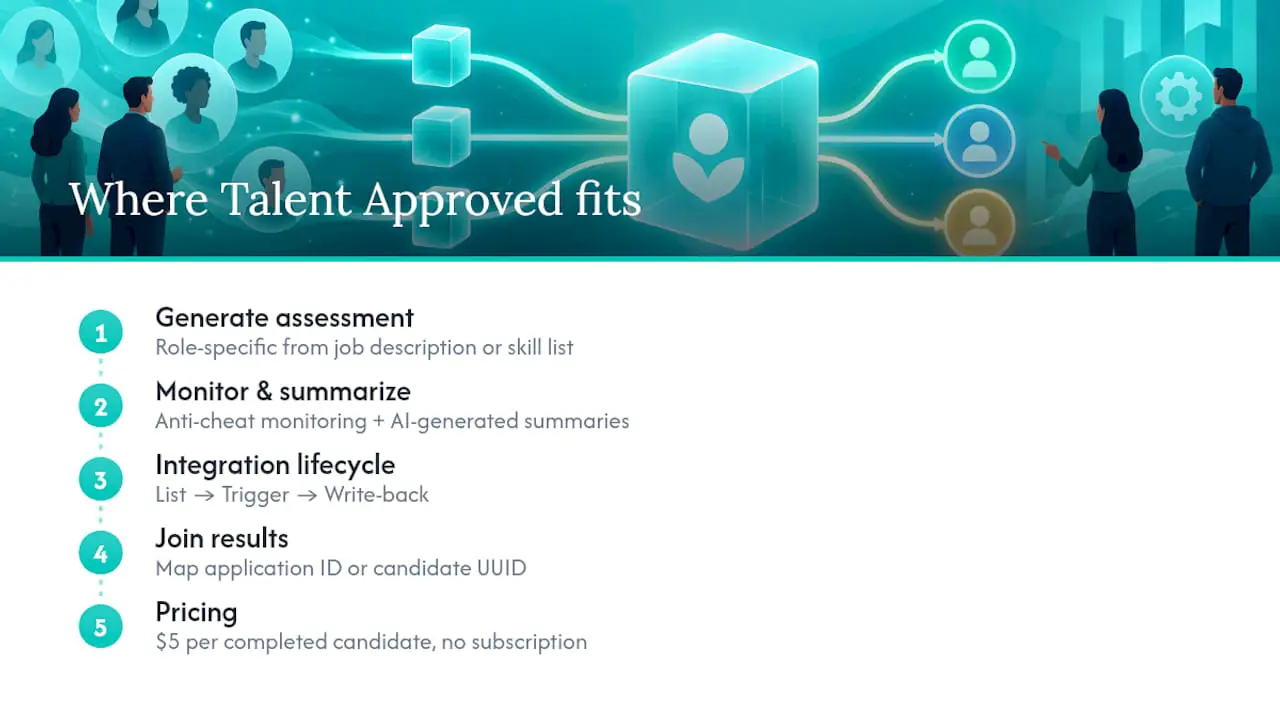
Talent Approved’s platform includes a feature that generates role-specific assessments from job descriptions or skill lists, alongside anti-cheat monitoring and AI-generated summaries that speed up review. On the integration side, Talent Approved follows the same list, trigger, and write-back lifecycle covered above, and mapping the application ID or candidate UUID on every call keeps results correctly joined to the right ATS record. The pricing model itself is pay-as-you-go, a $5 fee per completed candidate, with no subscription required. Teams implementing the integration can also review our guide to how instant assessments work and our EEOC compliance resources for implementation and validation details.
What HR teams get wrong about ATS integration
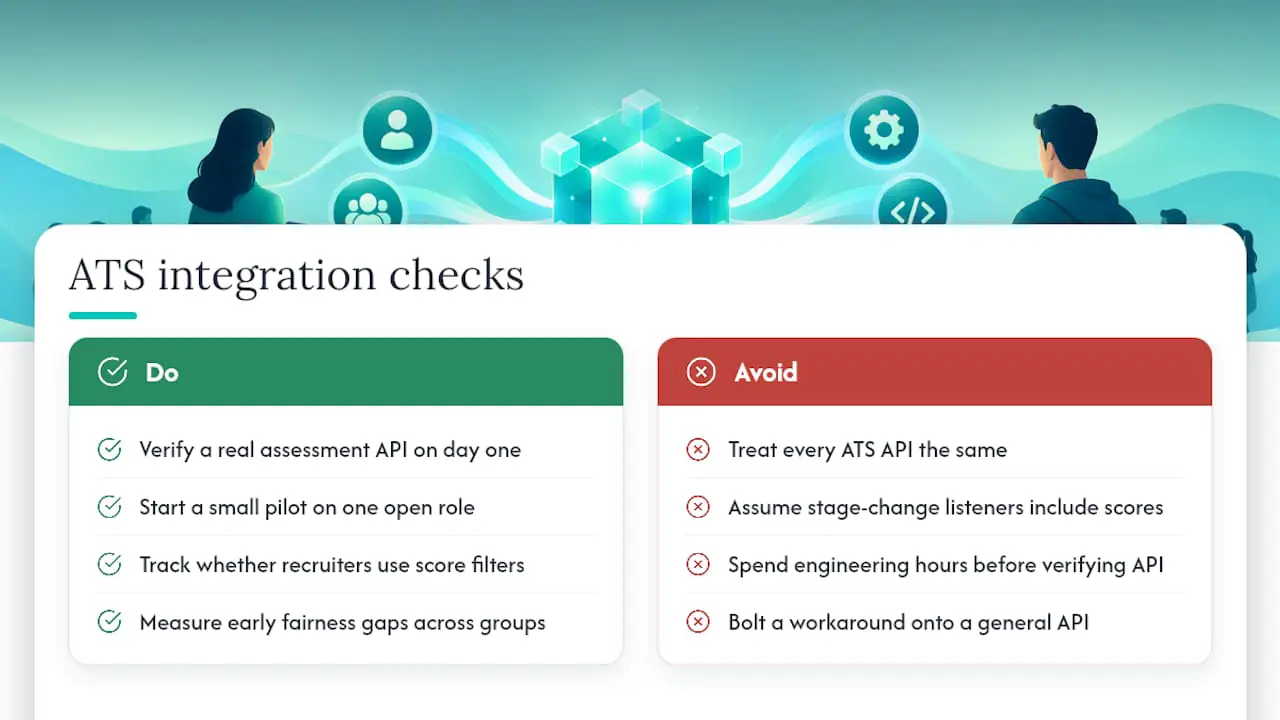
Most teams treat every ATS API the same, then get surprised when their “assessment integration” turns out to be a stage-change listener with no structured scoring attached. The fix is not more engineering hours. It is verifying, on day one, whether a real assessment API exists at all.
Start with a small pilot on a single open role before touching your full hiring pipeline. Watch two things at once: whether recruiters actually use the score filtering, and whether early results show any fairness gap across candidate groups. When a native assessment API or a proven unified API is available, choose it. Recruiter experience and legal defensibility both depend on structured, filterable results, not a workaround bolted onto a general-purpose API.
— Jimmie
Developer docs and compliance guidance worth bookmarking
Keep the Ashby assessments integration docs, the Unified Assessment API overview, and the EEOC’s testing guidance close at hand. For engineering support on the integration side, firms like Ampersand specialize in API and webhook implementation work.
Sources
- Ashby developer docs: creating an assessments integration
- Employment Tests and Selection Procedures | U.S. Equal Employment Opportunity Commission
FAQ
What does ATS integration mean?
ATS integration means connecting an applicant tracking system to another tool, such as an assessment platform, so data moves automatically between them instead of being copied by hand. For assessments specifically, that means listing test packages, triggering a test for a candidate, and writing the score back into the candidate’s ATS record.
What are the top ATS systems?
There is no single official ranking of top ATS platforms, and the right choice depends on company size, hiring volume, and required integrations. Rather than naming specific vendors, HR teams should evaluate any ATS by whether it exposes a documented assessment API, as described in Ashby’s developer docs, rather than relying on general popularity lists.
What is the difference between an ATS and a CRM?
An ATS manages the hiring workflow for open roles, tracking candidates from application through offer. A recruiting CRM instead manages long-term relationships with potential candidates, including people who are not actively applying, which is a different job than tracking active applicants through a pipeline.
What does ATS stand for?
ATS stands for applicant tracking system, the software HR teams use to post jobs, collect applications, and move candidates through hiring stages. When it supports a dedicated assessment API, it can also trigger skill tests and receive structured results directly on the candidate record, per the integration lifecycle described in Ashby’s API reference.