
How Instant Assessments Work for Hiring Teams

Instant AI-powered pre-employment skill assessments deliver role-specific tests, automated scoring, and AI summaries in minutes so hiring teams can quickly and reliably shortlist candidates. Platforms like Talent Approved and its Magic Create feature generate these tests directly from a job description, then proctor, score, and summarize results automatically. Under EEOC and ADA guidelines, assessments must be job-related, validated, and accompanied by reasonable accommodations — making the technology both a speed tool and a fairness framework.
The instant assessment process runs in three core steps:
- Generate: AI builds a role-specific test from your job description or skill list
- Deliver and proctor: Candidates complete the test online with anti-cheat monitoring active
- Score and summarize: Automated scoring and an AI-generated summary surface ranked results
Pro Tip: Send the assessment link immediately after a resume screen. Candidates who receive an invite within 24 hours of applying show measurably higher completion rates.
Key Takeaways
Instant AI-powered pre-employment assessments work best when they are job-specific, piloted before full rollout, and used to anchor structured interviews rather than replace them.
| Point | Details |
|---|---|
| Three-step process | Generate with AI, deliver with proctoring, then score and summarize automatically. |
| Pilot before scaling | Run with 50–100 participants and check completion rate, score distribution, and adverse impact. |
| Scores inform, not decide | Use AI summaries to build structured interview agendas, not as standalone hiring verdicts. |
| Legal requirements | EEOC and ADA require job-related, validated tests with documented accommodations. |
| Talent Approved | Magic Create, anti-cheat proctoring, and AI summaries at $5 per completed candidate. |
Table of Contents
- How the instant assessment process works, step by step
- Core components powering AI skill assessments
- What candidates actually experience during an assessment
- How scores are produced and what AI summaries actually tell you
- Where instant assessments fit in your hiring funnel
- How to pilot and validate an assessment before full rollout
- Implementation, integrations, and what it costs
- U.S. compliance and privacy considerations
- Security and anti-cheat: what to expect and how to investigate flagged sessions
- Practical use cases: instant assessments in action
- An experienced recruiter’s perspective on instant assessments
- Talent Approved makes it straightforward to get started
- Sources
- FAQ
How the instant assessment process works, step by step
Understanding the full sequence helps you map each tool feature to a real moment in your hiring workflow.
- Create the test. Paste your job description into Magic Create. The AI identifies required skills, selects or generates relevant questions, and assembles a timed assessment in minutes. You can edit questions, adjust difficulty, or add your own items before publishing.
- Configure delivery. Set a time limit, choose accommodations (extended time, screen reader compatibility), and send invites via email, SMS, or an ATS integration. Candidates receive a direct link with clear instructions.
- Proctor the session. Once a candidate starts, optional screen recording and webcam monitoring activate. Browser-lockdown settings prevent tab-switching. All session data is logged for later review.
- Score automatically. The platform grades responses against a rubric or ML-based scoring engine the moment the candidate submits. Confidence metrics and a ranked candidate list appear in your dashboard within seconds.
- Review and decide. An AI-generated summary highlights strengths, flags gaps, and suggests interview probes. The score informs your decision; it does not make it. Structured interviews validate what the assessment surfaces.
Skill-assessment platforms can reduce time-to-hire by up to 50% in some implementations, largely because automated scoring eliminates the manual review bottleneck between application and interview.
Core components powering AI skill assessments
Every instant assessment platform rests on a few key technical layers. Knowing what each one does helps you ask the right questions during vendor evaluation.
- AI test generation engine. Tools like Magic Create translate a job description into a structured question set, selecting item types (multiple choice, short answer, coding challenge, work sample) based on the role. AI enables adaptive testing that adjusts difficulty in real time to better pinpoint where a candidate’s ability actually sits.
- Question banks and templates. Pre-built libraries let you launch a validated assessment for common roles without starting from scratch. Templates are especially useful for high-volume or recurring positions.
- Proctoring module. Screen capture, webcam recording, browser lockdown, and session replay combine to create an auditable record of each test session. You review flagged events, not raw footage.
- Automated scoring engine. Rubric-based grading handles objective items. ML-predicted success probability layers on top for open-ended or simulation-based responses, producing a confidence band alongside the raw score.
- Data and integration layer. Audit logs, candidate metadata, and ATS/HRIS connectors keep assessment data synchronized with your existing workflow and support recordkeeping for compliance.
Pro Tip: During vendor setup, ask specifically: “How does your scoring model handle partial credit for open-ended responses, and can I see a sample confidence-band report?” Vendors who can answer concretely are the ones whose scoring you can actually defend.
What candidates actually experience during an assessment
Candidate experience directly affects completion rates, which in turn affects the quality of your ranked pool.
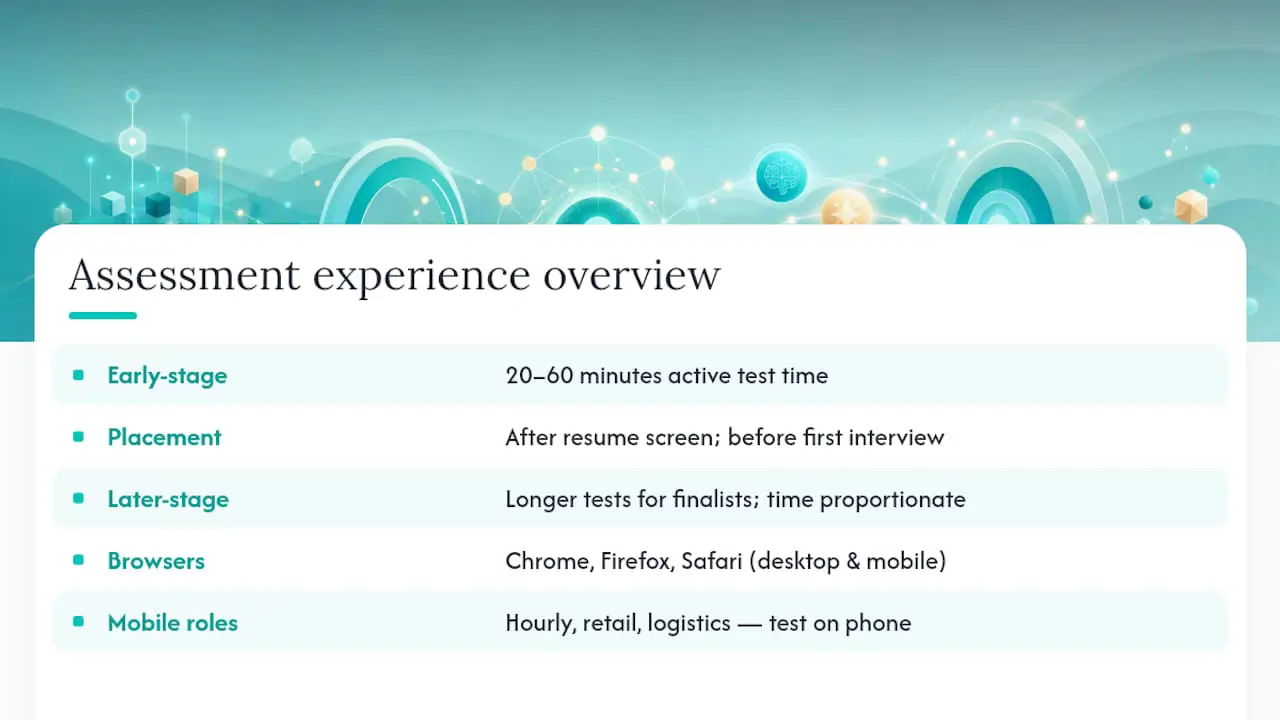
Most early-stage assessments target 20–60 minutes of active test time. Longer assessments belong later in the funnel, reserved for finalists where the time investment is proportionate to the stage. Placing the assessment after an initial resume screen and before a first interview keeps the funnel moving without asking candidates to invest heavily too early.
Device and browser requirements matter. Most platforms support Chrome, Firefox, and Safari on desktop and mobile. For roles where mobile completion is likely (hourly, retail, logistics), test your assessment on a phone before sending it. The candidate experience page for Talent Approved details supported devices and accessibility features.
ADA accommodations should be offered proactively. Extended time, screen reader compatibility, and alternative question formats are the most common requests. Document every accommodation granted and the rationale, since that record supports your EEOC defensibility.
Pro Tip: A short, plain-language email explaining what the assessment covers, how long it takes, and that accommodations are available can lift completion rates noticeably. Candidates who know what to expect are far more likely to finish.
How scores are produced and what AI summaries actually tell you
Scoring happens the moment a candidate submits. Objective items (multiple choice, true/false, code output) grade against a fixed rubric. Work samples and open-ended responses run through an ML scoring engine that compares the response to a trained model for that role, producing a score and a confidence band.
The AI-generated summary is where the output becomes genuinely useful for hiring managers. A well-built summary does three things:
- Highlights demonstrated strengths with the specific questions or tasks that produced them
- Flags skill gaps and rates their relevance to the role (a gap in a secondary skill matters less than one in a core requirement)
- Suggests structured interview probes so the hiring manager can validate or explore what the test surfaced
Assessments should complement interviews, not replace them. Train hiring managers to treat the AI summary as an agenda for the interview, not a verdict. A candidate who scored lower on a written communication task deserves a chance to explain their approach in conversation before a decision is made.
When presenting results, use banded recommendations rather than raw cutoffs. “Top third,” “mid-range,” and “needs further review” communicate relative standing without implying false precision. For guidance on reading AI summaries and acting on them, Talent Approved’s reviewer workflow documentation walks through each output field.
Where instant assessments fit in your hiring funnel
Placement and design discipline determine whether an assessment adds signal or just friction.
- Screen resumes first. Use the assessment to filter a qualified pool, not to replace the initial resume review entirely.
- Keep early-stage tests concise. Best-practice guidance recommends 30–60 minutes for early-stage tests, with longer simulations reserved for finalists.
- Make every question job-specific. If you cannot explain why a question predicts performance in this role, remove it.
- Calibrate cutoffs against real performance data. Run the assessment with current employees first to establish a baseline before applying cutoffs to applicants.
- Train hiring managers before launch. Managers who understand confidence bands and summary flags use results more consistently and make fewer score-only decisions.
Red flags for misuse include: using a single score as the sole hiring criterion, applying different cutoffs to different demographic groups, and running assessments so late in the funnel that candidates have already accepted other offers.
Track these metrics after launch: completion rate, score distribution (look for ceiling or floor effects), time-to-hire, and adverse impact indicators by demographic group. Assessment templates help standardize question sets across roles, which makes score distributions more comparable over time.
Pro Tip: If your score distribution is heavily skewed toward the top or bottom, the test is probably too easy or too hard for your applicant pool. Adjust difficulty before drawing conclusions from the data.
How to pilot and validate an assessment before full rollout
A pilot confirms that your assessment predicts job performance before you use it to screen real applicants at scale.
- Define the target role and success metrics. Pick one role. Identify two or three measurable performance indicators (90-day retention, manager rating, output quota).
- Run the assessment with current employees. Their scores give you a baseline and let you check whether high performers score higher than low performers.
- Conduct expert review. Have 3–5 subject-matter experts review each question for relevance and accuracy. Remove or rewrite items they flag.
- Run cognitive interviews. Ask 5–15 participants to think aloud while completing the assessment. This surfaces confusing instructions or ambiguous questions before they affect real candidates.
- Soft launch with a small applicant group. Pilot steps including soft launches with 50–100 respondents help surface operational issues without committing to full deployment.
- Analyze results and iterate. Review completion rate, score distribution, and any adverse impact signals. Adjust before scaling.
| Pilot metric | Acceptable threshold | Action if below threshold |
|---|---|---|
| Completion rate | Above 50% | Shorten test or improve invite communication |
| Score distribution | Normal or near-normal | Adjust difficulty level |
| Adverse impact ratio | Above 0.80 | Review and revise flagged items |
| Predictive validity | Positive correlation with performance | Revise question types or scoring rubric |
Implementation, integrations, and what it costs
Most platforms connect to common ATS and HRIS systems via API or native integration. SSO, calendar exports, and reporting dashboards round out the standard integration set. Operational ownership typically splits across three groups: HR owns assessment design and compliance; IT manages SSO and data security; hiring managers consume results and conduct follow-up interviews.
A realistic implementation timeline looks like this:
- Weeks 1–6: Pilot phase. Build one assessment, run it with employees, gather feedback, iterate.
- Weeks 7–10: Iteration phase. Revise questions, calibrate scoring, train managers.
- Weeks 11–18: Full deployment. Roll out to active requisitions, monitor metrics, adjust.
Talent Approved uses a pay-as-you-go model with no subscription required. The fee is $5 per completed candidate assessment, which makes cost directly proportional to hiring volume. There are no seat licenses or annual commitments, so teams can pilot without a large upfront investment.
Pro Tip: Assign one HR team member as the assessment owner for each role. That person handles invite logistics, monitors completion rates, and flags any accommodation requests. Distributed ownership without a single point of contact is where pilots stall.
U.S. compliance and privacy considerations
Running pre-employment assessments in the United States requires attention to several overlapping legal frameworks.
- EEOC guidance requires that assessments be job-related, validated for the specific role, and free from disparate impact. If a test screens out a protected group at a disproportionate rate, you need documented evidence that the skill tested is genuinely required for the job.
- ADA accommodations must be offered to any candidate who requests them. Document each request, the accommodation provided, and the outcome. Treat accommodation requests as standard process, not exceptions.
- State privacy laws (California’s CPRA, Virginia’s CDPA, and others) require candidate consent before collecting biometric or behavioral data. Publish a clear data retention policy and collect only the data the assessment actually needs.
- Recordkeeping for scoring decisions and audit logs supports defensibility in the event of a challenge. Most platforms generate these logs automatically; confirm that your vendor’s retention period meets your state’s requirements.
Pre-employment assessments must be validated for job-relatedness and administered consistently to all candidates in the same role. Disparate impact analysis should be conducted regularly, and accommodations must be offered proactively under the ADA. Consult qualified legal counsel for jurisdiction-specific questions before deploying assessments at scale.
Security and anti-cheat: what to expect and how to investigate flagged sessions
Anti-cheat features vary by platform, but the core set includes screen recording, webcam recording, browser lockdown, IP and device fingerprinting, and copy/paste detection. Systems flag suspicious events automatically: unusually fast answer timing, tab-switching, multiple IP addresses within a single session, or answer patterns that deviate sharply from the norm for that question.
When a session is flagged, follow this investigation sequence:
- Review the session replay for the specific flagged events. Look at timing, not just the flag label.
- Check metadata. IP address, device type, and session duration often explain anomalies (a VPN, a shared computer, or a slow connection).
- Contact the candidate. Ask them to explain the flagged behavior before drawing conclusions. A candidate who tab-switched may have been checking a reference document they were told they could use.
- Escalate to interview. If the flag remains unexplained, use the interview to probe the skills the assessment was meant to measure. A candidate who genuinely has the skills will demonstrate them in conversation.
Pro Tip: Disable webcam recording for roles where candidates are unlikely to have a private space to test (hourly, field-based, or remote roles in low-bandwidth areas). The data you collect should be proportionate to the risk you are managing, and unnecessary recording can deter qualified candidates.
Practical use cases: instant assessments in action
Three scenarios show how the instant assessment process adapts to different hiring contexts.
- High-volume hourly hiring. A retailer uses a template-based 20-minute assessment for all store associate applicants. Because the test is standardized, managing high-volume hiring assessments becomes a repeatable process rather than a manual one. Completion rates stay high because the test is short and mobile-friendly.
- Part-time freelancer screening. A marketing agency sends a 30-minute writing simulation to freelance applicants before a first call. The AI summary flags candidates whose writing matches the agency’s style guide, cutting the time spent on introductory calls by roughly half. For a detailed operational example, the part-time applicant evaluation guide covers this scenario directly.
- Technical role with coding simulation. A software team uses a coding challenge plus an AI summary to identify which candidates to bring onsite. The summary’s suggested interview probes replace a generic technical screen, making the onsite conversation more targeted and shorter.
An experienced recruiter’s perspective on instant assessments
The biggest mistake teams make with instant assessments is treating the score as a decision rather than a starting point. The technology is genuinely useful — it surfaces skill signals that a resume simply cannot provide, and it does so at a speed that keeps candidates engaged before they accept another offer. But the value compounds only when hiring managers are trained to read the AI summary critically, not just sort by rank.
The second mistake is skipping the pilot. Deploying an unvalidated assessment at scale is worse than using no assessment at all, because it creates a false sense of objectivity. A two-week pilot with current employees costs almost nothing and tells you whether the test actually predicts the performance you care about. That is the step most teams skip when they are in a hurry, and it is the one that determines whether the whole program is defensible six months later.
Talent Approved makes it straightforward to get started
Hiring teams that need fast, reliable skill data without a long procurement cycle get a direct path with Talent Approved. The $5-per-completed-candidate model means your cost scales with your actual hiring volume, not a seat count. Magic Create builds a role-specific assessment from your job description in minutes, and built-in anti-cheat tools with screen and webcam recording give you an auditable record of every session.
Getting started takes three steps: create your first skill test using Magic Create, pilot it with 20–50 candidates, and review the AI summaries to calibrate your scoring before full rollout. No subscription, no implementation fee, and no long-term commitment required.
Sources
- How to Use Skill Assessment Platforms to Hire Faster in 2025
- Best Practices for Custom Skills Assessments - Skillfuel
- Pre-Employment Testing: 7 Best Practices for Employers
FAQ
What are instant assessments in hiring?
Instant assessments are AI-generated, role-specific skill tests delivered online, scored automatically, and summarized by AI so hiring teams can rank candidates within minutes of test completion.
How long does an instant assessment take to build?
With a tool like Magic Create, a role-specific assessment can be generated from a job description in minutes. Reviewing and editing the output typically adds 15–30 minutes before the test is ready to send.
How do instant assessments handle ADA accommodations?
Platforms should allow you to offer extended time, screen reader compatibility, and alternative question formats. Document every accommodation request and the response to support EEOC defensibility.

Can a candidate’s score be the sole reason for rejection?
No. Best practice requires that scores complement structured interviews and other evidence. Using a single score as the only decision criterion creates legal exposure and misses nuance the interview would catch.
What does a pilot phase for an instant assessment involve?
A pilot typically runs 4–6 weeks and includes expert review of questions, cognitive interviews with 5–15 participants, and a soft launch with 50–100 candidates to validate completion rates, score distribution, and predictive validity before full deployment.