
How Assessment Templates Scale Hiring for HR Teams

Assessment templates are the single most practical tool for scaling recruitment without sacrificing evaluation quality. They standardize how every candidate gets judged, reduce the cognitive load on interviewers, and plug directly into the digital workflows your team already uses. Here is what structured templates actually do for your hiring process:
- Standardize criteria so every evaluator scores candidates on the same dimensions, not their own interpretation of “culture fit”
- Cut decision fatigue by providing predefined rating scales and reusable comment banks instead of blank text fields
- Reduce bias by anchoring scores to observable behaviors rather than gut impressions
- Speed up decisions because structured forms give hiring panels comparable data they can debrief in minutes
- Integrate with ATS platforms to centralize candidate data automatically, removing manual data entry from the process
What types of assessment templates do hiring teams actually use?
1. Communication and interpersonal skills templates
These cover universal criteria that apply to nearly every role: clarity of expression, active listening, and the ability to adapt tone for different audiences. Rating scales typically run from 1 to 5, with behavioral anchors at each level so two interviewers reach the same score independently.
2. Values and culture alignment templates
Rather than asking “Do you fit our culture?” these templates break alignment into observable behaviors. Does the candidate give examples of taking ownership? Do they describe collaboration or solo execution when asked about past projects? Concrete prompts replace vague impressions.
3. Cognitive ability and problem-solving templates
Situational judgment tests present realistic work scenarios and score how candidates reason through them. These templates work well for roles where analytical thinking is the core requirement, from operations analysts to product managers.
4. Role-specific technical skill templates
A software engineering template looks nothing like one for a sales development representative. Technical templates pull from frameworks like O*NET or SFIA to map required competencies to testable tasks. The key is keeping technical criteria to 2 or 3 items per form so evaluators stay focused.

5. Behavioral interview evaluation templates
Structured around the STAR method (Situation, Task, Action, Result), these templates prompt interviewers to capture evidence for each competency rather than a general impression. They are especially useful for leadership and cross-functional roles where past behavior predicts future performance.
6. Work sample and portfolio review templates
For creative, writing, or design roles, these templates define what “good” looks like before the review starts. Criteria might include originality, adherence to brief, and technical execution, each with a defined rating scale and space for specific evidence.
7. Reference check templates
Standardized reference questions with consistent scoring prevent the common problem of one recruiter asking three questions and another asking fifteen. A short template with 4 to 6 targeted questions produces data you can actually compare across candidates.
How to implement assessment templates in your hiring process
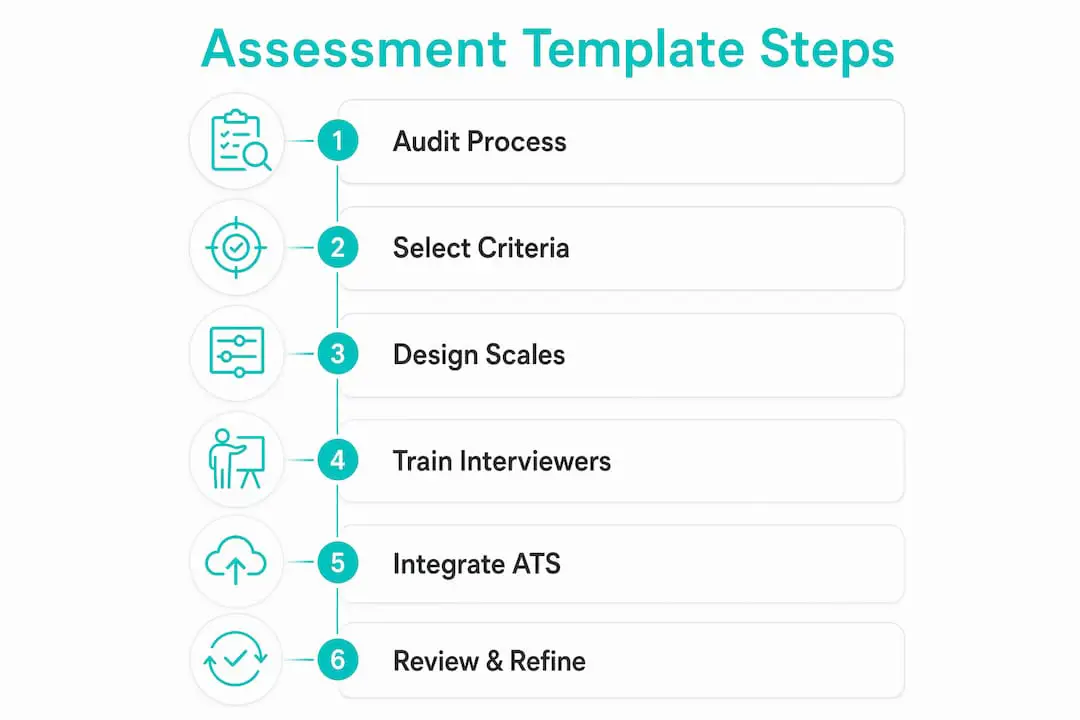
1. Audit your current evaluation process. Before building templates, map where inconsistency lives. Are interviewers scoring candidates differently for the same role? Are hiring decisions taking longer than they should? The gaps you find will tell you which templates to prioritize.

2. Select 3 to 4 universal criteria. Limiting criteria to under eight items per form prevents evaluation fatigue. Start with criteria that apply across all roles, such as communication, problem-solving, and accountability, then add 2 to 3 role-specific items on top.
3. Design behaviorally anchored rating scales. A 5-point scale only works if each point is defined. “3 = Meets expectations” tells an evaluator nothing. “3 = Candidate explained their reasoning clearly but needed one follow-up prompt” gives them a concrete benchmark.
4. Train your interviewers. Templates only work when everyone uses them the same way. Walk hiring managers through each criterion, run a calibration session with sample responses, and document what evidence is required to justify each rating. Talent Approved’s guidance on training hiring managers covers this process in detail.
5. Integrate with your ATS. Automating submission via tools like Zapier centralizes evaluation data so hiring panels can compare scores without chasing down spreadsheets. Most modern ATS platforms support form integrations natively.
6. Review and refine regularly. Pull data from completed assessments every quarter. If evaluators consistently score a criterion at the top or bottom of the scale, the criterion is probably too vague or too easy. Adjust the anchors or replace the item entirely.
Pro Tip: Use conditional logic to swap role-specific sections in and out of a single master template. One form can serve a dozen job titles without creating a separate document for each.
How assessment scales make candidate evaluation more consistent
Behaviorally anchored rating scales (BARS) are the backbone of fair candidate evaluation. Unlike generic numeric scales, BARS tie each score to a specific observable behavior, so two evaluators watching the same interview reach comparable conclusions.
- Reduce evaluator drift by giving interviewers a concrete reference point at every score level, not just the endpoints
- Improve panel debriefs because scores backed by behavioral evidence are easier to discuss and defend than gut-feel ratings
- Support data aggregation across hiring cycles, letting you spot patterns like which criteria best predict 90-day performance
- Meet compliance requirements in jurisdictions like New York City, where the automated employment decision tool rules require documented, auditable evaluation criteria
Without consistent scales, evaluators risk inconsistent tone and severity across candidates, which undermines fairness especially when multiple interviewers are involved. Predefined criteria with evidence requirements shift the burden from memory to documentation, producing a record that supports both the hiring decision and any post-hire review.
What makes a “smart” assessment template go beyond a static form?
Static forms collect data. Smart templates generate it. The difference is in how they handle volume, variation, and feedback loops.
| Feature | Static form | Smart template |
|---|---|---|
| Criteria flexibility | Fixed for all roles | Conditional logic adapts sections by role |
| Evaluator support | Blank text fields | Reusable comment banks with keyboard shortcuts |
| Data output | Raw scores | Aggregated analytics with trend visibility |
| Maintenance | Manual updates | Informed by template analytics and outcome data |
| Bias mitigation | Minimal | Structured anchors and evidence requirements |
Reusable comments and digital shortcuts cut the time evaluators spend writing feedback, which keeps quality high even when hiring volume spikes. Analytics from template usage reveal where criteria are unclear or where candidates consistently struggle, giving you the data to refine the template rather than guess at what is not working.
Talent Approved’s Magic Create feature takes this further by generating role-specific assessments from a job description in minutes, with AI-generated summaries that surface the most relevant candidate data for faster decisions.
Pro Tip: Treat your templates as living tools. Set a quarterly review cadence, pull completion and scoring data, and update criteria based on what the numbers show, not what feels right.
Key Takeaways
Assessment templates scale hiring by standardizing evaluation criteria, reducing evaluator bias, and integrating with digital workflows to produce faster, more consistent hiring decisions.
| Point | Details |
|---|---|
| Limit criteria per form | Use 3–4 universal criteria plus 2–3 role-specific items to prevent evaluation fatigue. |
| Use behavioral anchors | Tie each rating scale point to an observable behavior so two evaluators reach comparable scores. |
| Automate ATS integration | Connect templates to your ATS to centralize candidate data and remove manual data entry. |
| Apply conditional logic | One master template with dynamic sections replaces a separate form for every job title. |
| Refine with analytics | Review template data quarterly to identify unclear criteria and improve scoring consistency. |
FAQ
What are assessment templates in hiring?
Assessment templates are structured forms with predefined criteria, rating scales, and comment prompts that standardize how interviewers evaluate candidates across a hiring process.
How do assessment templates reduce hiring bias?
By anchoring scores to specific observable behaviors rather than general impressions, templates reduce the influence of personal bias and make evaluation criteria consistent across all interviewers.
How many criteria should an assessment template include?
Keeping forms to under eight items total works best. A practical structure is 3 to 4 universal criteria combined with 2 to 3 role-specific items, as noted in evaluation form research.
Can assessment templates integrate with an ATS?
Yes. Most modern ATS platforms support form integrations, and tools like Zapier can automate submission so candidate scores are centralized without manual data entry.
How often should you update assessment templates?
A quarterly review cadence works well for most teams. Pull scoring and completion data to identify criteria that are too vague or consistently skewed, then adjust anchors or replace items based on what the data shows.