
Invite Candidates to Assessment with 4 Email Templates and ATS Checks

Send a personalized email invite with a unique assessment link and a short deadline of a few days for shortlisted candidates. Every invite needs three things: a unique link that tracks progress and locks after submission, a clear due date, and brief instructions with an estimated completion time. Get those right and everything else, from templates to automated reminders, just supports the process.
TL;DR:
- Personalized email invites should include a unique, trackable link, a specific deadline within a few days, and clear instructions to minimize dropouts.
- For high-volume roles, shareable links or bulk CSV uploads are more efficient but offer less candidate tracking than personalized emails.
- Setting short, explicit deadlines combined with reminder schedules at 48 and 24 hours before, plus a follow-up, significantly boosts completion rates.
- Handling candidate inquiries quickly and consistently, especially regarding technical issues or extensions, is crucial for maintaining a positive candidate experience.
- Using a platform that automates invites, monitoring, reminders, and anti-cheat controls helps reduce errors and streamline the assessment process.
Table of Contents
- Invite Candidates to Assessment: Email, Link, or Bulk CSV?
- What Should an Assessment Invitation Email Say?
- How Do You Automate Assessment Invitations in Your ATS?
- What Increases Assessment Completion Rates?
- How Do You Fix Expired Links or Missing Invitations?
- How Talent Approved Simplifies the Invite Workflow
- How Should You Handle Candidate Questions About an Assessment Invite?
- What Privacy Rules Apply to Assessment Invitations?
- Balancing Personalization With Automation
- Send Assessment Invites Without the Manual Work
- Sources
- FAQ
Invite Candidates to Assessment: Email, Link, or Bulk CSV?
The method you pick should match the volume and stakes of the role, not habit. Platforms generally support three invitation paths, and each one trades off personalization against speed.
Email invites work best for shortlisted or high-touch candidates. Because you’re sending a personal message, make sure your template pulls in an assessment-link placeholder rather than a static URL. Every candidate needs their own unique link that tracks progress and locks the submission once completed, so a shared link defeats the purpose.
Shareable self-service links suit career pages or high-volume, early-funnel roles where you’re screening dozens or hundreds of applicants at once. The tradeoff is real: self-service links reduce your per-candidate tracking and control compared to a direct email invite, since you can’t always tell who clicked or when.
Bulk CSV invites solve the volume problem for structured hiring pushes. Platforms typically require name and email columns, plus an optional deadline column, so CSV uploads for bulk invitations follow the same basic format across most systems.
Decision criteria worth applying before you choose:
- High-volume, entry-level roles: bulk CSV or shareable link
- Senior or specialized roles: personalized email, always
- Need for tracking and follow-up: email invite with a unique link
- Career page or ongoing pipeline: shareable link
What Should an Assessment Invitation Email Say?
A good invite does four jobs across the candidate’s journey: it invites, reminds, nudges, and occasionally extends. Building these as reusable templates saves your team from writing fresh copy every time, and it keeps your tone consistent no matter who’s sending.
- Initial invite. Use a subject line that names the role directly (“Next step for your [Job Title] application”). Greet the candidate by name, reference the specific role, insert the assessment-link placeholder, and state the estimated duration and due date plainly. Close with a contact for questions.
- Reminder. Keep this one short. Restate the deadline, drop the direct link again, and skip the pleasantries. A common cadence sends one reminder at 48 hours before the deadline and a second at 24 hours out.
- Short follow-up. If the deadline passes with no submission, a brief nudge works better than silence. Acknowledge the missed date, offer a short grace window if appropriate, and outline what happens next either way.
- Extension or grace template. Some candidates genuinely need more time, whether it’s a scheduling conflict or a technical issue on their end. Log every extension you grant so your team can track who’s on an adjusted timeline versus the standard one.
Personalization does more work here than most recruiters expect. Recruiters consistently find that addressing candidates by name and referencing their specific application improves response and completion rates over generic blasts.
Pro Tip: Keep your initial invite under 150 words. Candidates skim, and a shorter email with a clear link gets clicked faster than a paragraph explaining why the assessment matters.
For more on writing invite copy that reduces bias while staying candidate-friendly, this practical guide to AI skill assessments covers the design side well.
How Do You Automate Assessment Invitations in Your ATS?
Automation removes the single biggest point of failure in assessment invites: someone forgetting to send one. The standard pattern moves a candidate into a specific pipeline stage, and that stage change automatically triggers the assessment invite without anyone touching a keyboard.
Getting there safely means running through a short setup checklist first:
- Preview the email exactly as a candidate would see it, not just the raw template
- Send a test invite to yourself or a colleague to confirm the placeholder resolves into a working link
- Confirm the due-date default matches your intended deadline window
- Set your reminder cadence before you turn automation on, not after
Recruiting teams that build this out see the payoff in consistency. Every candidate gets the same message, the same deadline logic, and the same link structure, which cuts down on missed invites and shortens time-to-hire. Templates you configure once, scaling hiring through reusable assessment templates, keep paying off every time a new candidate enters the pipeline.
What Increases Assessment Completion Rates?
Completion rates live or die on friction and urgency. Candidates who don’t finish an assessment usually aren’t rejecting the process. They’re deprioritizing it because nothing in the invite pushed them to act now.
A short, explicit deadline changes that. Recruiters who set a hard a short deadline window of a few days in the invitation itself see stronger urgency than those who leave it open-ended, because an open deadline reads as low priority. Pairing that deadline with a stated time estimate matters just as much: a candidate who knows the assessment takes a short, estimated time is more likely to start it than one guessing it might eat their evening.
Tactics worth building into every invite:
- State the estimated completion time in the first two sentences, not buried in a footer
- Schedule reminders at 48 hours and 24 hours before the deadline, plus one short follow-up after it passes
- List a single support contact for tech issues or accommodation requests, not a generic help desk
- Add a one-click start link so candidates aren’t hunting for a login screen
Clear deadlines paired with scheduled reminders reduce delays across the hiring pipeline by keeping the assessment visible instead of letting it slip to the bottom of an inbox.
How Do You Fix Expired Links or Missing Invitations?
Most invite problems fall into three buckets, and each has a fast fix.
- Expired link. Decide whether to extend the existing deadline or issue a brand-new invite. Extend when the candidate is still actively engaged and just ran short on time; issue a fresh invite when the original link has fully lapsed or the role’s requirements changed.
- Candidate says they never got the email. Check spam and promotions folders first, confirm the email address on file is correct, then resend. Sending yourself a test invite first isolates whether the problem is deliverability or a typo in the candidate’s address.
- Locked or duplicate submission. Assessment links typically lock automatically once a candidate submits, which prevents retakes by design. If a genuine retake is warranted, most platforms require issuing an entirely new assessment rather than unlocking the old one.
Before contacting platform support on any of these, gather the candidate’s email, the timestamps involved, the job or assessment ID, and a screenshot of the error. That packet turns a back and forth support ticket into a one message fix.
How Talent Approved Simplifies the Invite Workflow
Everything above, templates, unique links, reminders, and automation, is exactly what Talent Approved builds into its platform from the start. Its Magic Create feature turns a job description or skill list into a role-specific assessment in minutes, so you’re not stitching together questions before you can even send an invite.
Once the assessment exists, the invite workflow maps directly onto the practices this article recommends:
- Unique candidate links with built-in progress tracking and automatic submission locking
- Reminder automation so you’re not manually tracking deadlines across dozens of candidates
- Anti-cheat controls, including screen and webcam monitoring, that protect the integrity of every invite you send
- AI-generated summaries that speed up review once responses come in, so reviewers aren’t reading raw transcripts one by one
For HR teams juggling templates, placeholders, and reminder cadences by hand, this consolidates the whole invite-to-review cycle into one workflow instead of five disconnected tools.
How Should You Handle Candidate Questions About an Assessment Invite?
Candidates will email back. Some will ask how long the assessment takes, some will report a broken link, and a few will ask for more time. How you handle these determines whether a strong candidate finishes the process or quietly drops out.
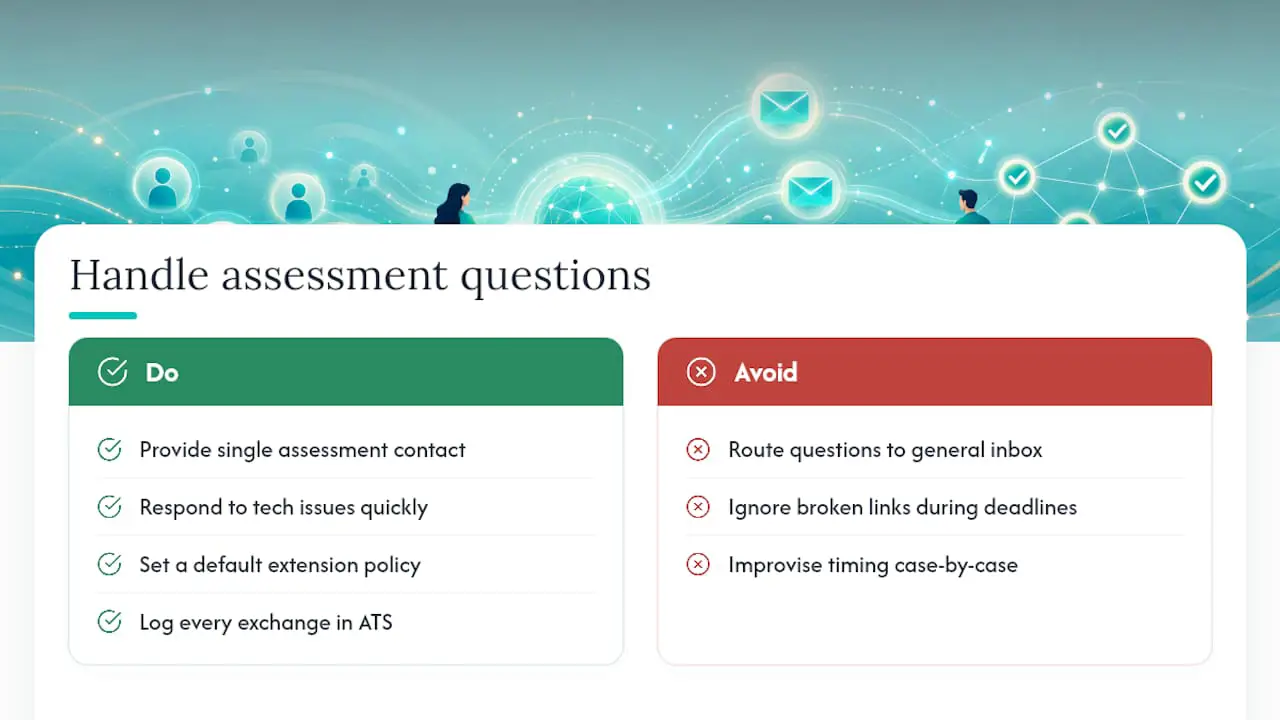
Set up a single, clearly named contact for assessment-related questions rather than routing them through a general recruiting inbox. When the contact is specific, response times shrink and candidates feel like someone is actually watching the process. Most questions cluster around three themes: technical trouble (a link that won’t load, a browser compatibility issue), timing (can I get more time, does the deadline account for time zones), and clarification (what does this section actually test, is there a practice mode).
Answer technical issues fast, ideally within a few hours, since a candidate stuck on a broken link during a narrow deadline window will assume the worst about your process rather than wait patiently. For timing requests, have a default policy ready, whether that’s a standard 24 hour grace period or a case by case review, so you’re not improvising an answer for every candidate individually.
Document every exchange in your ATS or tracking sheet, especially extensions granted or technical issues reported. This keeps your evaluation fair: if two candidates hit the same bug, they should get the same accommodation, not different treatment based on who happened to email first. Consistency here also protects you if a rejected candidate later questions how the process was run. Clear, prompt answers signal a well-run candidate experience even before anyone finishes the actual assessment.
What Privacy Rules Apply to Assessment Invitations?
Assessment invites carry personal data the moment they leave your outbox, a name, an email address, and often a link to results that may include video or screen recordings if anti-cheat monitoring is active. Treating that data casually creates real exposure.
Start with collection limits. Only gather what the assessment actually needs to evaluate the role. If your platform records webcam or screen activity for anti-cheat purposes, say so plainly in the invitation itself rather than burying it in a terms page candidates never open. Consent should be informed, not assumed.
Storage and retention matter just as much as collection. Decide upfront how long completed assessments, recordings, and candidate responses stay in your system after a hiring decision is made, and stick to that window instead of letting old candidate data accumulate indefinitely. Access should be limited to the people actually involved in the hiring decision, not the entire HR team by default.

Cross-border hiring adds another layer. If you’re inviting candidates who live in a different jurisdiction than your company, the data protection rules governing consent, storage, and candidate rights can differ from your own. When in doubt, route the specifics past your legal or compliance team rather than assuming your home market’s rules travel with you.
None of this needs to slow down your invite process. A platform built with data handling in mind, clear consent language, defined retention, and limited access, lets you move fast without treating candidate privacy as an afterthought.
Balancing Personalization With Automation
Personalize the invite for your top candidates and automate the rest; a senior engineering hire gets a handwritten note, a graduate program gets a clean template. Track completion rate and time-to-hire, not gut feel, to know which mix is actually working for your pipeline.
— Jimmie
Send Assessment Invites Without the Manual Work
Talent Approved is built for HR teams who want the templates, unique links, and reminder automation this article covers, without stitching together three separate tools to get there. Its Magic Create feature turns a job description into a role-specific assessment in minutes, then hands you unique candidate links, automated reminders, and anti-cheat monitoring as part of the same workflow.
That matters most for teams still sending invites manually or copying links from a spreadsheet, because every candidate who slips through a missed deadline or a broken link is a lost applicant you paid to source. Talent Approved uses a pay-as-you-go pricing model based on completed candidate assessments rather than requiring a subscription, which fits teams hiring in bursts as easily as those hiring year round. If your invite process still relies on manual sends and hand-tracked deadlines, see how Talent Approved’s assessment platform works and set up your first role-specific assessment today.
Sources
- Sending a Workable Assessment to a candidate
- Teammates
- AI Skill Assessment: A Hiring Manager’s Practical Guide — AnyLearns Blog
FAQ
What does candidate assessment mean?
A candidate assessment is a structured test that measures a candidate’s actual job-relevant skills, rather than relying on a resume or interview alone to predict performance.
What are the key steps in the assessment process?
The core steps are defining the skills to test, building or selecting the assessment, sending the invitation with a unique link and deadline, monitoring completion and sending reminders, then reviewing results to rank candidates.
How do I invite candidates to an assessment?
Send a personalized email with a unique assessment link, a clear due date, and an estimated completion time, or use a bulk CSV upload with name and email columns for high-volume roles.
What are the key principles of a fair assessment process?
Job-relevant testing, consistent invitation and reminder timing for every candidate, transparent instructions and deadlines, and secure handling of candidate data all support a fair, bias-reduced process.
How long should candidates have to complete an assessment?
A 48 to 72 hour window is common practice, since a short, clear deadline creates urgency without pressuring candidates into rushing a skills test.