
Assessment Teams: Embed Verification to Defend Online Test Results

Identity verification for online tests connects a claimed test taker to a real, verified person before the exam clock starts. For any high-stakes assessment, the baseline worth adopting is document capture plus a selfie biometric match, backed by liveness detection and a human review fallback for edge cases. Layer in privacy safeguards, accessibility routes, and a clean handoff to your assessment platform, and you have a defensible process from the first click.
TL;DR:
- A layered identity verification process, including document capture, selfie biometric match, liveness detection, and human review, is essential for high-stakes assessments.
- Continuous re-verification during exams and comprehensive audit logs significantly increase exam integrity and help defend credentials if challenged.
- Verification solution performance depends on decision speed, fraud detection layers, accessibility support, audit capabilities, and integration options.
- Proper testing, clear fallback procedures, accurate instructions, and compliance with regional data laws are critical for successful implementation.
- Combining identity proofing with role-specific assessments, as in Talent Approved, streamlines workflow and offers a cost-effective, scalable solution.
Table of Contents
- What Identity Verification Includes: Methods and Where They Sit in the Test Flow
- Why Identity Verification Matters for Assessment Integrity and Defensibility
- Core Features and Evaluation Criteria for Verification Solutions
- Implementation Best Practices and How to Reduce Verification Failures
- How Talent Approved Integrates Verification Into Role-Specific Assessments
- Privacy Regulations and Compliance for Online Identity Verification
- Technological Advancements and Emerging Trends in Identity Verification
- Preventing and Detecting Sophisticated Fraud Tactics
- Comparing Identity Verification Approaches by Feature Category
- Author Checklist and Final Practical Recommendations
- Get Started With Verified Skill Assessments
- Sources
- FAQ
What Identity Verification Includes: Methods and Where They Sit in the Test Flow
A login screen tells you someone has a password. It doesn’t tell you who’s sitting behind the keyboard. That distinction is the entire reason identity verification exists as a discipline separate from authentication.
Account authentication confirms credentials match a record. Identity proofing confirms the person holding those credentials is who they claim to be, in real time, on test day. Confusing the two is one of the most common gaps in exam security programs. A shared password, a purchased login, or a proxy test taker sails right through authentication and never touches identity proofing at all, unless your workflow forces the issue.
Here’s how the core methods break down operationally:
- Document capture: The candidate photographs a government-issued ID (passport, driver’s license, national ID card). Optical character recognition (OCR) pulls the name, date of birth, and document number, while forensic checks look for tampering signals like inconsistent fonts, altered security features, or mismatched hologram patterns.
- Facial comparison: A selfie gets matched against the photo on the document, either as a direct image-to-image comparison or against a biometric template. The system returns a confidence score rather than a flat yes or no, which matters because a 62% match and a 98% match should never trigger the same downstream action.
- Liveness detection: This confirms a live human is present, not a photo, video, or deepfake held up to the camera. Passive liveness analyzes the image itself for texture and depth cues; active liveness asks the candidate to blink, turn their head, or say a number. Active methods catch more spoofing attempts but also produce more false rejections for candidates with limited mobility or poor connections, which is why the trade-off needs a policy decision, not a default setting.
- Human-in-the-loop review: Automated systems escalate anything they can’t resolve confidently. That includes non-standard documents, recent name changes, lighting failures, or accommodation requests. Experts consistently recommend routing these cases to a trained reviewer rather than defaulting to an automatic rejection, since human review handles edge cases automated checks mishandle far more reliably than a rules engine alone.
Where these checks sit in your workflow matters as much as the checks themselves. Most programs run verification as a pre-assessment gate, blocking test entry until identity is confirmed. Higher-stakes certifications add continuous checks, periodic re-verification snapshots during the session to catch a mid-test swap. Every program, regardless of stakes, should generate post-session audit records, timestamped logs of the verification decision, the confidence score, and any human reviewer notes, filed alongside the exam result itself.
Why Identity Verification Matters for Assessment Integrity and Defensibility
Skipping identity verification doesn’t just create a security gap. It creates a liability that surfaces months later, when a credential gets challenged.
Four threats show up repeatedly in exam integrity discussions: impersonation (someone else takes the test entirely), proxy testing (a paid stand-in sits for the real candidate), credential fraud (a stolen or borrowed login), and increasingly, AI-generated spoofing, where synthetic faces or voice clones attempt to fool biometric checks. That last category is growing fast enough that liveness detection vendors now treat deepfake resistance as a core feature rather than an edge case.
Strong verification does more than block bad actors. It shrinks the investigation workload when a result gets disputed, because you have a documented decision trail instead of a shrug. Standards-focused organizations like ETS advise that identity verification should scale to test stakes and stay defensible under scrutiny, and that principle holds whether you’re running a professional certification or an internal skills screen.
A workable rule of thumb: match verification strength to consequence. A low-stakes practice quiz needs little more than a login. A certification exam that unlocks a license, a job offer, or a six-figure salary decision needs the full stack: document capture, biometric match, liveness, and a human reviewer on standby. The middle tier, most corporate skills assessments, sits comfortably with document plus selfie match and a lighter-touch review queue.
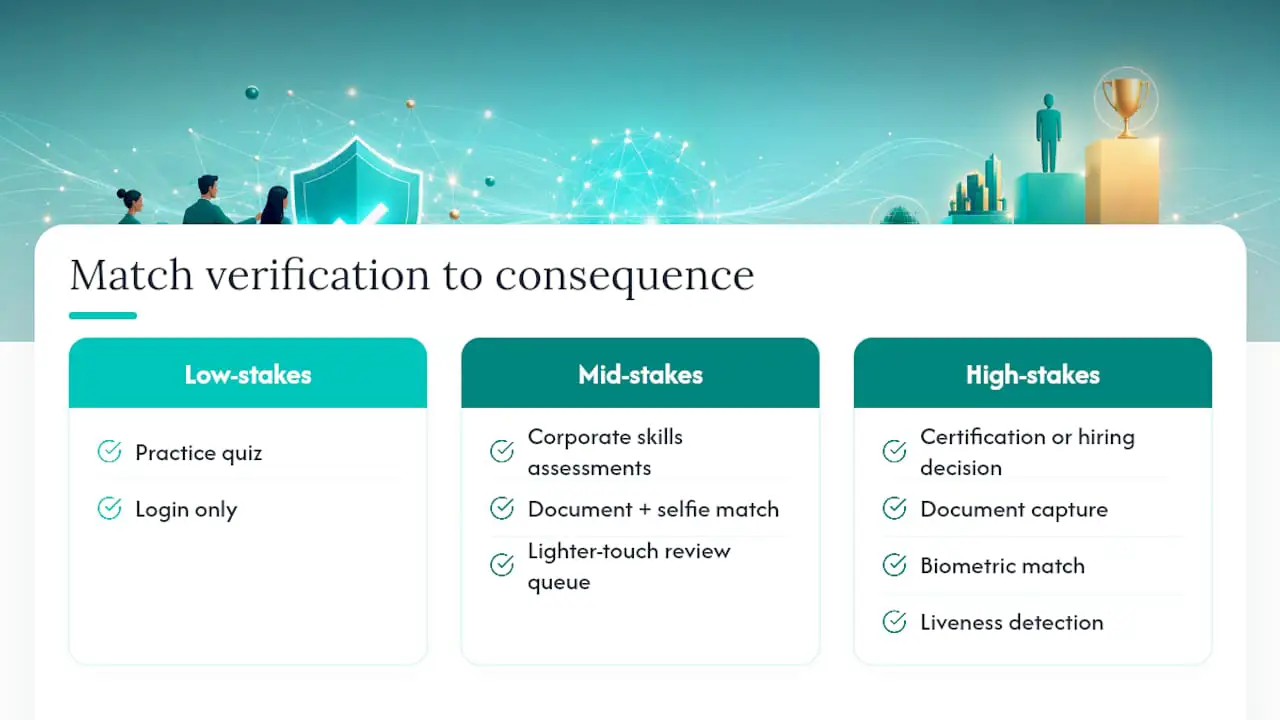
The upside compounds. Every verified session you can defend on paper is one less dispute that eats a program manager’s week, and one more reason candidates trust that the credential they earned actually means something.
Core Features and Evaluation Criteria for Verification Solutions
Choosing between verification approaches (whether you’re building internal rules or evaluating vendor technology) comes down to a short list of criteria that actually predict real-world performance.
- Decision latency and human-review SLA: Some providers report automated decisions in roughly 6 to 10 seconds, with full capture flows completing in under two minutes, which fits neatly inside a scheduled exam window. Ask what the SLA looks like when a case escalates to human review, since a five-minute wait during a timed exam creates its own fairness problem.
- First-try pass rate and assisted capture: UX guidance embedded directly in the capture screen, like real-time frame scoring that tells a candidate to hold the camera steadier or move closer to a light source, measurably reduces abandonment and repeat attempts.
- Fraud signal layers: The strongest setups combine document forensics, liveness, device and network intelligence, and biometric confidence scoring rather than leaning on any single signal, since layered checks catch spoofing that a single-point check misses.
- Privacy, retention, and exportability: Confirm how long biometric data and document images are retained, whether audit logs export cleanly for compliance reviews, and who has access to raw images versus derived scores.
- Accessibility support: Alternate ID workflows for candidates without standard documents, plus a human support channel for anyone who fails automated capture repeatedly, need to exist before launch day, not as a patch afterward.
- Integration options: LMS and ATS webhooks, API access, and SSO compatibility determine how much friction gets added to your existing candidate experience.
Pro Tip: Ask any vendor for their false-rejection rate broken down by device type, not just an overall accuracy number. A system that performs well on desktop webcams can fail disproportionately on older Android phones, and that gap becomes an accessibility problem if you don’t catch it in evaluation.
Implementation Best Practices and How to Reduce Verification Failures
Most verification failures trace back to something far more mundane than fraud: bad photos.
- Embed the flow in-browser. Avoid sending candidates to a separate app download or an external redirect. Embedded, in-browser verification flows complete at higher rates than redirect-based flows, largely because every extra step is a chance for someone to abandon the session.
- Give candidates specific capture instructions. Poor image quality, glare, blur, or cropped edges, causes most verification failures. Tell candidates to use a dark matte background, avoid flash, hold the device steady, frame the whole ID including corners, and position themselves near natural window light instead of overhead fluorescent lighting.
- Design a clear fallback path. Build in a defined number of retries, a clean escalation to human review, and a plain-language message explaining what’s happening and roughly how long it will take.
- Monitor pass rate and failure reasons continuously. Track why sessions fail, not just how often, and tune your sensitivity thresholds to match your program’s actual risk tolerance rather than a vendor’s default setting.
- Run sandboxed volume tests before rollout. Testing sandboxes with simulated identities let teams validate rule sets under controlled conditions, and simulating edge-case documents (expired IDs, non-standard formats, accommodation scenarios) before go-live catches problems that only show up at scale, like a device-fingerprint threshold that flags an entire class of older phones as suspicious.
Pro Tip: Run your sandbox test during a simulated peak window, not a quiet afternoon. Verification systems that perform fine at low volume sometimes queue up human review cases faster than your reviewers can clear them once real exam-day traffic hits.
How Talent Approved Integrates Verification Into Role-Specific Assessments
Talent Approved builds identity checks into the same workflow as its role-specific skill assessments, so verification isn’t a bolt-on step that lives in a different system. Its anti-cheat mechanisms, including screen and webcam monitoring and full session recording, pair with identity checks to create one continuous record rather than two disconnected logs.
The platform’s Magic Create feature lets a hiring team generate a tailored, role-specific assessment from a job description in minutes, and verification rules travel with that assessment rather than requiring separate setup. AI-generated performance summaries then give reviewers a defensible, documented decision trail alongside the candidate’s score, which matters when a hiring manager needs to explain a decision months later.
Because Talent Approved runs on a pay-as-you-go pricing model with no subscription commitment, assessment teams can pilot a verification-backed workflow on a small candidate pool before committing to a full rollout. That structure also fits naturally with the instant assessment workflows many hiring teams already run for remote screening.
Privacy Regulations and Compliance for Online Identity Verification
Collecting a government ID photo and a facial biometric puts you squarely inside data protection law, and the rules differ by region in ways that catch programs off guard.
Under the EU’s General Data Protection Regulation, biometric data used for identification counts as a special category of personal data, which means stricter consent, storage, and processing requirements than an ordinary name-and-email record. Under the California Consumer Privacy Act and related state laws, candidates generally have rights to know what biometric and document data was collected, request deletion, and in some states, receive specific notice before biometric collection even begins.
Practical compliance starts with three questions. How long do you retain document images and biometric templates after a decision is made? Who inside your organization, or which vendor, can access raw images versus a derived match score? Can you produce an exportable audit log if a regulator or a candidate requests one? A program that can’t answer all three cleanly has a compliance gap, not just a documentation gap.
Cross-border testing programs face an added layer: a candidate verified in one jurisdiction may fall under different retention and consent rules than a candidate in another, even inside the same exam window. Building retention and access policies around the strictest applicable standard, rather than the loosest, tends to save a rewrite later.
Technological Advancements and Emerging Trends in Identity Verification
The verification stack assessment programs relied on five years ago (a static document scan and a single selfie match) is being replaced by continuous, multi-signal systems that treat identity as an ongoing check rather than a one-time gate.
Liveness detection has moved from simple blink tests toward passive analysis that reads texture, depth, and micro-movement in a single frame, which shortens the capture time without sacrificing accuracy. Device and network intelligence now sits alongside biometric matching as a standard layer, flagging signals like an unusual IP location or a device previously linked to a different candidate profile, which catches proxy testing that a facial match alone would miss.
The most consequential shift is deepfake resistance. As synthetic video and voice cloning tools become more accessible, verification vendors are building detection models specifically trained to spot the artifacts those tools leave behind, subtle inconsistencies in lighting reflection, blink timing, or audio phase that a human reviewer might miss but a trained model catches reliably.
Continuous authentication, periodic re-checks throughout a test session rather than a single gate at the start, is also gaining ground for high-stakes certification exams, where a mid-session swap carries real consequences. Expect this to become standard for licensure and regulatory exams well before it becomes standard for lower-stakes corporate screening, simply because the cost-benefit math differs sharply between the two.
Preventing and Detecting Sophisticated Fraud Tactics
Fraud tactics have gotten more technical, but the countermeasures follow a predictable logic: no single check should carry the whole burden.
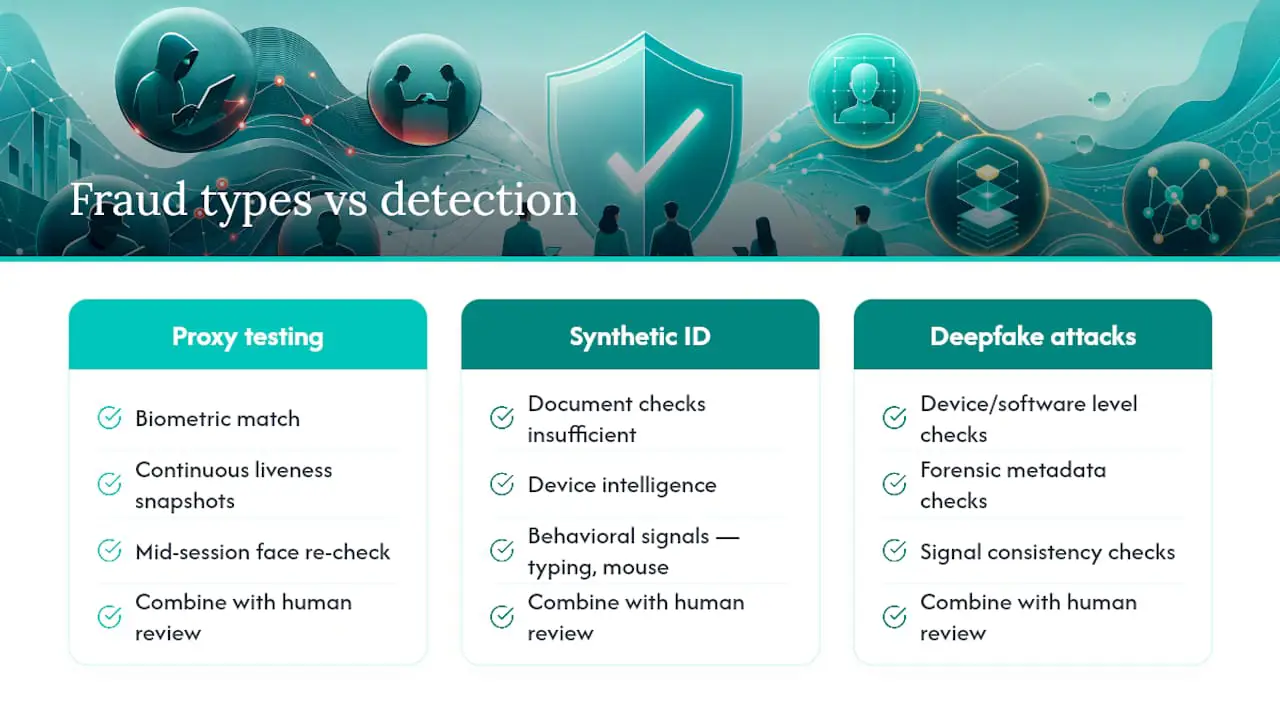
Proxy testing, where a paid stand-in takes the exam, is best caught by combining biometric match with continuous liveness snapshots during the session rather than a single check at the start. A stand-in who passes the opening gate can still get flagged mid-session if the face in a later frame doesn’t match the one that opened the exam.
Synthetic identity fraud, built from a mix of real and fabricated data, tends to slip past document checks alone because the document itself may look legitimate. Layering device intelligence and behavioral signals, like unusual typing cadence or a mouse movement pattern inconsistent with human input, catches what a document scan misses.
Deepfake and injection attacks, where a candidate feeds a manipulated video stream directly into the camera input rather than holding up a physical screen, require detection at the device and software level, not just the image level. This is where forensic checks that examine metadata and signal consistency earn their keep, since a visually convincing deepfake can still carry technical fingerprints that give it away.
The practical takeaway for assessment teams: budget for layered detection rather than a single best-in-class tool. A program that combines document forensics, biometric confidence scoring, liveness, and human review catches far more than any one of those methods running alone.
Comparing Identity Verification Approaches by Feature Category
Rather than ranking named vendors, it helps to compare verification approaches by the feature categories that actually drive outcomes, since two solutions with similar marketing language can behave very differently under real exam conditions.
| Feature category | What to look for | Why it matters for exams |
|---|---|---|
| Decision speed | Automated results in seconds, with a defined SLA for human escalation | Keeps candidates inside a scheduled exam window without unfair delay |
| Fraud signal depth | Document forensics plus biometric matching plus device intelligence | Single-signal checks miss synthetic and proxy fraud that layered checks catch |
| Accessibility routing | Alternate ID workflows and a live human support channel | Prevents legitimate candidates with accommodation needs from being locked out |
| Audit and export | Exportable, timestamped decision logs with reviewer notes | Supports defensibility if a certification or hiring decision is later challenged |
| Integration depth | API, webhook, LMS, and SSO support | Determines how much friction gets added to your existing candidate flow |
Entry-level tools built for one-off checks often handle document capture and a single selfie match well but lack the continuous re-verification and audit export depth that certification-grade programs need. Enterprise-grade platforms tend to cover the full feature set but can introduce more configuration overhead than a smaller program actually needs, which is exactly why matching the tool to your risk tier, rather than defaulting to the most feature-dense option, saves both money and setup time.
Author Checklist and Final Practical Recommendations
Start small: define your risk tiers, pick a method mix for each, and run a limited pilot before a full rollout. Track pass rates and failure reasons from day one, not month three. Confirm your accessibility fallback actually works by testing it with a real accommodation scenario, not just a policy document. Above all, build for defensibility first. A verification program that produces a clean audit trail and treats candidate experience as a real metric, not an afterthought, outperforms one built purely around blocking fraud.
— Jimmie
Get Started With Verified Skill Assessments
Talent Approved pairs identity verification with role-specific skill testing in one workflow, so you’re not stitching together a separate proofing tool and a separate assessment platform. The anti-cheat layer, screen and webcam monitoring, session replays, and AI-generated summaries, gives you the same defensible record this guide recommends, without a second vendor contract to manage.

Because pricing runs pay-as-you-go at $5 per completed candidate with no subscription required, you can pilot a verification-backed assessment on a handful of candidates before deciding whether to expand it program-wide. Combine that with Magic Create, which builds a tailored, role-specific test from a job description in minutes, and a pilot that might have taken weeks to configure elsewhere can be running by tomorrow. Head to the pricing page to see the exact cost for your candidate volume and start your first verified assessment.
Sources
For deeper technical detail, see Plaid’s identity verification documentation, ABBYY’s guidance on human-in-the-loop review, the PMC research on usability in digital verification, and Leodex’s breakdown of common verification failures.
FAQ
Is Onfido a Legitimate Identity Verification Company?
Onfido is an established identity verification vendor used across banking, gig-economy, and other sectors requiring document and biometric checks. Legitimacy in this space comes down to whether a vendor’s methods, decision transparency, and compliance documentation match your program’s specific risk and regulatory needs, not the vendor’s name recognition alone.
How Can I Pass My Identity Verification Check?
Most failures come down to image quality, so use natural light, a dark matte background, and hold your device steady while framing the entire ID including its corners. Avoid glare from flash or glossy surfaces, since poor capture conditions cause the majority of verification rejections.
Is There a Free App That Can Verify My Identity?
Some identity verification tools offer free-tier or trial access for individual checks, but assessment programs generally need a paid solution with audit logging, human review escalation, and compliance features that free consumer apps don’t provide. For candidate skill assessments specifically, verification is typically bundled into the testing platform itself rather than run as a separate free app.
Do All Test Takers Need the Same Level of Identity Verification?
No. Verification strength should scale with the stakes of the exam. A low-consequence practice test needs minimal proofing, while a certification or hiring decision that carries real weight warrants the full stack of document capture, biometric match, liveness, and human review fallback.
What Does Talent Approved Charge for Assessments With Verification Included?
Talent Approved runs on a pay-as-you-go model at $5 per completed candidate, with no subscription fee required. Verification and anti-cheat features are part of the same assessment workflow rather than a separate line item.