
How Skills Inventories Are Created: A Step-by-Step Guide

A skills inventory is a validated register of who can actually do what across your workforce, with evidence attached to every claim. It’s not a survey and it’s not a spreadsheet of job titles. Getting there takes three moves: define the decision the inventory needs to support, collect data from more than one source, and build in a way people can actually use for hiring or succession. Talent Approved can speed up the collection step by generating role-specific assessments that produce ready-to-verify evidence, but the sequence below works whether you’re piloting with five people or five hundred.
Start with these three moves:
- Define scope first. Pick one decision (a hiring gap, a succession bench, a mobility program) before you touch any data.
- Collect validated evidence. Combine self-assessment, manager review, and at least one objective source like a work sample or test.
- Make it usable, not just accurate. Build the inventory so a hiring manager or HR analyst can query it in minutes, not weeks.
Key Takeaways
A trustworthy skills inventory depends on defining the decision it supports, validating data from multiple sources, and updating it on real triggers, not a fixed calendar.
| Point | Details |
|---|---|
| Start with one decision | Pick a hiring gap, succession bench, or mobility goal before collecting any data. |
| Pilot narrow, then scale | Limit the first version to one team or job family to catch process problems early. |
| Combine evidence sources | Pair self-assessment with manager review and a work sample or test for reliability. |
| Set governance rules upfront | Require corroborating evidence for any rating tied to promotion or succession decisions. |
| Use Talent Approved to speed validation | Magic Create builds role-specific assessments fast, with anti-cheat monitoring to support credible evidence. |
Table of Contents
- How Skills Inventories Are Created, Step by Step
- Choosing Assessment Methods: Self-Reports, Manager Reviews, and Tests
- Building a Skills Taxonomy and Matrix That Actually Holds Up
- Governance Rules That Make the Data Trustworthy
- Keeping the Skills Inventory a Living Document
- Turning the Inventory Into Hiring and Succession Decisions
- What Piloting a Skills Inventory Actually Teaches You
- Speed Up Validated Evidence With Talent Approved
- Sources
- FAQ
How Skills Inventories Are Created, Step by Step
Most failed skills inventories die from scope creep, not bad intentions. Someone decides to “map every skill in the company” and six months later there’s a 400-column spreadsheet nobody trusts. The fix is sequencing: narrow the business problem first, then build only the data needed to solve it.
- Define the purpose and success metric. Decide whether this inventory exists to fix a hiring bottleneck, build a succession bench, or support internal mobility. Each goal changes which skills matter and how strict your evidence rules need to be.
- Pick a pilot group. Choose one department, one job family, or one leadership tier. A narrow pilot surfaces process problems before they scale into company-wide messes, a point PerformYard’s implementation guidance backs directly.
- Draft role success profiles and a basic taxonomy. Write down what “good” looks like for each role before you ask anyone to self-rate anything. Skipping this step is the single most common reason inventories end up full of inconsistent, incomparable data.
- Set evidence rules before collecting anything. Decide which skills need a work sample, which need manager sign-off, and which can rely on self-report alone.
- Communicate early and often. Tell employees why the data is being collected, who sees it, and how it affects them. Silence here breeds suspicion and low response rates.
Pro Tip: Run the pilot with a hard deadline, like six weeks. A time-boxed pilot forces you to publish results and learn from gaps instead of endlessly perfecting the taxonomy before anyone sees value.
Treat the first version as a decision-support tool, not a permanent archive. Fuel50’s framework for skills inventories argues the inventory only becomes useful once it’s tied into broader skills intelligence and an actual skills architecture, so build toward that from day one rather than treating the pilot as a finished product.
Choosing Assessment Methods: Self-Reports, Manager Reviews, and Tests
No single assessment method gives you a trustworthy picture on its own. Visier’s research on skills inventories found that inventories built from self-evaluation, manager assessment, and job analysis combined produce a far more robust view than any single source, and that finding should shape how you weight each input.
- Self-assessment is fast and cheap, but employees tend to overrate skills they use often and underrate ones they rarely get feedback on. Use it as a starting signal, never as the final word for high-stakes decisions.
- Work samples and practical tests are the strongest evidence for technical skills like coding, writing, or data analysis, because they measure output instead of opinion. This is where a structured assessment tool for scoring which skills to test earns its keep.
- Manager assessments and 360 feedback work best for leadership and interpersonal skills, where behavior over time matters more than a single test score.
- Combining sources with weighting, like requiring a work sample plus manager confirmation for any promotion-track skill, closes most of the reliability gap.
Pro Tip: Never let self-assessment alone justify a promotion decision. Pair it with at least one external source, even something as simple as a peer confirmation.
Building a Skills Taxonomy and Matrix That Actually Holds Up
A skills matrix is only useful if every row means the same thing to everyone reading it. Start by naming and defining each skill precisely enough that two different managers would rate it the same way. “Communication” is too vague; “writes technical documentation clear enough for a non-expert audience” is testable.

A workable proficiency scale usually has four levels: novice, competent, proficient, and expert, each with a one-line behavioral description so raters aren’t guessing. Every row in the matrix needs these fields: skill name, category, definition, proficiency level, evidence type, last-validated date, and an owner responsible for keeping it current.
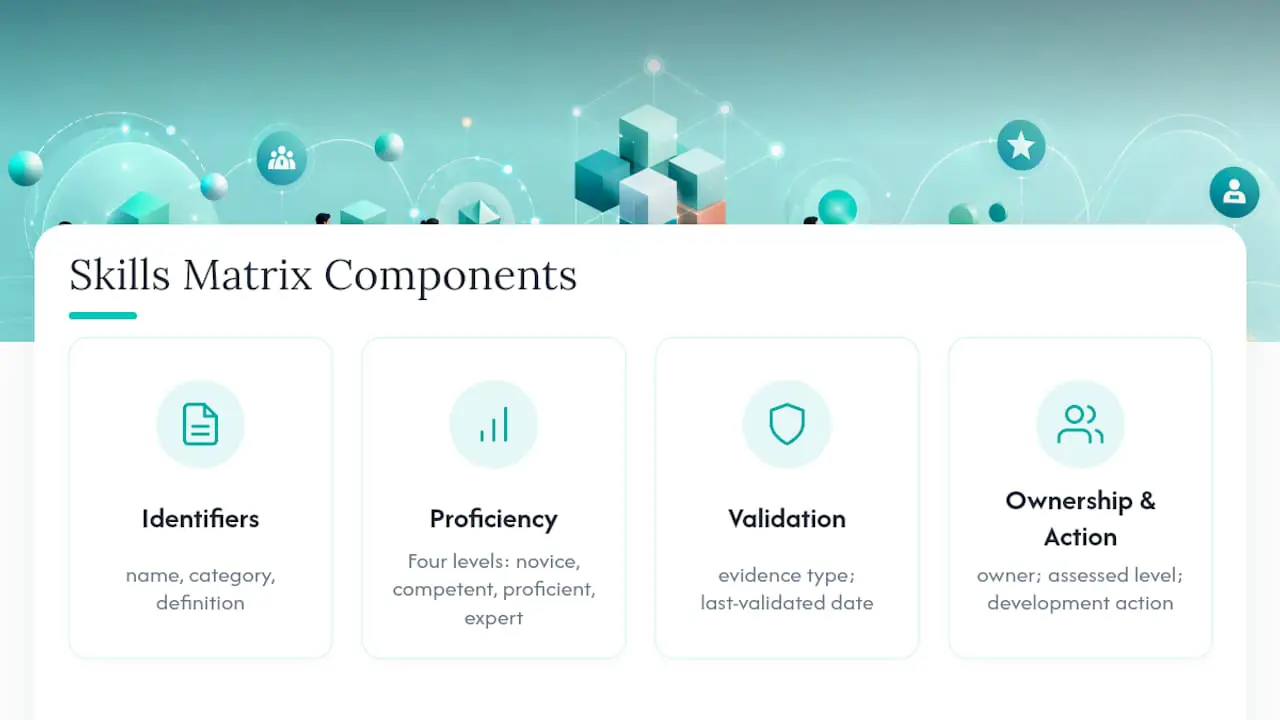
PerformYard’s template guidance recommends each row also capture the assessed level, the evidence supporting it, and the development action planned, which turns the matrix from a static record into something a manager can act on. A single example row might read: Data analysis, Technical, proficient, evidence = certification plus manager sign-off, last validated March 2026, owner = HR analytics team. That’s enough for a recruiter or promotion committee to trust the entry without re-verifying it from scratch.
Governance Rules That Make the Data Trustworthy
Governance is what separates a credible skills inventory from a list people quietly ignore. Set a rule up front: any rating tied to promotion, succession, or hiring decisions needs corroborating evidence, not just a self-report.
- Assign skill owners for each category who are accountable for definitions staying current.
- Name a data steward responsible for enforcing evidence rules and flagging stale entries.
- Give HR analytics ownership of the overall dataset, including access permissions and reporting.
- Set an audit schedule triggered by promotions, completed projects, and new certifications, not just a fixed annual review.
- Limit access to what each role needs. Skills data touches sensitive performance information, so treat it with the same care as compensation data.
Visier’s guidance on combining evidence sources specifically recommends requiring stronger corroboration for high-stakes decisions like promotion, which is the single easiest governance rule to enforce and the one most companies skip.
Keeping the Skills Inventory a Living Document
A skills inventory that’s updated once a year is basically a historical record, not a decision tool. Spreadsheets work fine for a pilot of one team, but they buckle fast once you’re tracking evidence fields and validation dates across a whole department. An HRIS module handles scale better but often lacks flexible taxonomy fields. Dedicated skills platforms sit in between, built specifically for evidence tracking and proficiency scales.
- Update triggers should include new hires, promotions, completed projects, and new certifications, not a calendar reminder alone.
- Self-service access lets employees update their own profiles between formal review cycles, which keeps the dataset current without adding to HR’s workload.
- Dashboards and integrations with learning systems turn a static list into a forecasting tool, letting you spot emerging skill gaps before they become hiring emergencies.
Fuel50’s research ties this directly to skills intelligence, arguing that the payoff of a living inventory comes from trend analysis, not just record-keeping. A workforce skills audit run annually alongside the update cadence catches drift the day-to-day triggers miss.
Turning the Inventory Into Hiring and Succession Decisions
The whole point of building this data is using it, so treat every inventory update as an input to a live decision, not an archive entry.
- Build success profiles for open roles directly from the taxonomy you already validated, so job postings reflect real proficiency requirements instead of guesswork.
- Match internal candidates against those same profiles to surface people who might not have applied on their own. HRD’s reporting on skills inventories found this widens succession pools by surfacing leadership capability that’s often hidden across functions.
- Map readiness gaps for each candidate against the target role and turn each gap into a specific development action, not a vague “needs growth” note. Skills-based succession planning frames this as assigning readiness categories, like ready-now, ready-in-one-year, and development-needed.
- Bring the data into interviews and promotion committees as evidence, referencing the specific skill row and validation date rather than a general impression.
Building a skills-based hiring process around this data replaces gut-feel interview decisions with something a hiring manager can actually defend.
What Piloting a Skills Inventory Actually Teaches You
The biggest mistake teams make isn’t picking the wrong taxonomy. It’s trying to map every skill in the company before proving the concept works on one team. Overbroad scope, missing governance, and relying on self-report alone are the three failures that show up again and again.
Start narrow, get one leader publicly using the data for a real decision, and iterate from there. A small, credible win beats a comprehensive dataset nobody trusts.
— Jimmie
Speed Up Validated Evidence With Talent Approved
Building a skills inventory is only as fast as your evidence collection, and that’s usually the bottleneck. Talent Approved shortens that gap by generating role-specific skill assessments directly from a job description or a skill list using its Magic Create feature, so instead of spending weeks designing tests for a pilot group, you get a structured assessment ready in minutes.
The platform’s built-in anti-cheat monitoring and AI-generated candidate summaries give you the kind of corroborating evidence your governance rules require, without adding manual review work for your team. That matters most when you’re scaling a pilot from one department to several, where consistent evidence capture across dozens of candidates is what keeps the inventory trustworthy instead of turning it into another spreadsheet full of unverifiable self-reports. Whether you’re testing technical skills for a hiring pipeline or validating readiness for an internal promotion, Talent Approved lets you build the assessment, run it, and get a ranked, evidence-backed summary back the same day. Head to the platform to build your first assessment from an existing job description and see how quickly a validated skill profile comes together.
Sources
- Skills Inventory: What Is It And How to Create One? – Fuel50
- HR Glossary | What is a skills inventory? | Visier
- Skills Inventory Examples, Templates & How to Build One - PerformYard
- Why Skills Inventories Are Becoming a Strategic Leadership Development Tool - HRD
FAQ
What Is a Skills Inventory Used For?
A skills inventory is used to make hiring, succession, and internal mobility decisions based on validated evidence of what employees can actually do, rather than job titles or tenure.
How Long Does It Take to Build a Skills Inventory?
A focused pilot covering one team can be built and validated in about six weeks; a company-wide rollout takes longer and should be phased department by department.
What’s the Difference Between a Skills Inventory and a Skills Matrix?
A skills inventory is the underlying database of employee skills and evidence, while a skills matrix is a visual or tabular view of that data used for comparison and gap analysis.
Do Employees Need to Verify Their Own Skills Data?
Self-assessment is a useful starting point, but ratings tied to promotion or succession decisions need corroborating evidence like manager review, work samples, or certifications.
Can Software Speed Up Skills Inventory Creation?
Yes. Platforms like Talent Approved generate role-specific assessments directly from job descriptions, which speeds up evidence collection and gives HR teams a consistent, verifiable data source for the inventory.