
Build an Enterprise Skills Taxonomy for Smarter Hiring

A practical enterprise skills taxonomy is the fastest way to turn vague job requirements into objectively scored hires. The core plan: build a minimum viable taxonomy of core skills with several proficiency levels, integrate it into your ATS and assessment platform, and run an 8–12 week pilot on 3–5 high-volume roles. The expected results are standardized job description language, faster shortlisting through skill filters, and measurable improvement in candidate quality and time-to-hire.
Start this week by extracting skills from 20 core roles using O*NET occupational data or the SFIA framework as a foundation. Define proficiency indicators for each skill, map at least one assessment to each skill in the taxonomy, and push the structure into your ATS as filterable fields. Talent Approved can accelerate the assessment creation step by generating role-specific tests directly from job descriptions, then ranking candidates automatically against taxonomy-mapped skills.

The pilot does not need to be perfect. It needs to be consistent enough to prove the model works before you scale.

Table of Contents
- What is a skills taxonomy, and how does it differ from a framework or ontology?
- How does a skills taxonomy improve hiring outcomes?
- What are the core building blocks of an enterprise skills taxonomy?
- How do you build an enterprise skills taxonomy in eight steps?
- Who owns the taxonomy, and how do you keep it current?
- What should you look for in tools, and how do you integrate the taxonomy into your hiring stack?
- How do you use the taxonomy in day-to-day hiring?
- What metrics prove the taxonomy is improving hiring outcomes?
- What causes skills taxonomies to fail, and how do you prevent it?
- Mini taxonomy example, implementation checklist, and cost considerations
- How do you design proficiency indicators and map assessments to taxonomy skills?
- Key Takeaways
- The part of skills taxonomy projects most teams underestimate
- How Talent Approved helps you run a skills taxonomy pilot faster
- Useful sources for implementation
- FAQ
What is a skills taxonomy, and how does it differ from a framework or ontology?
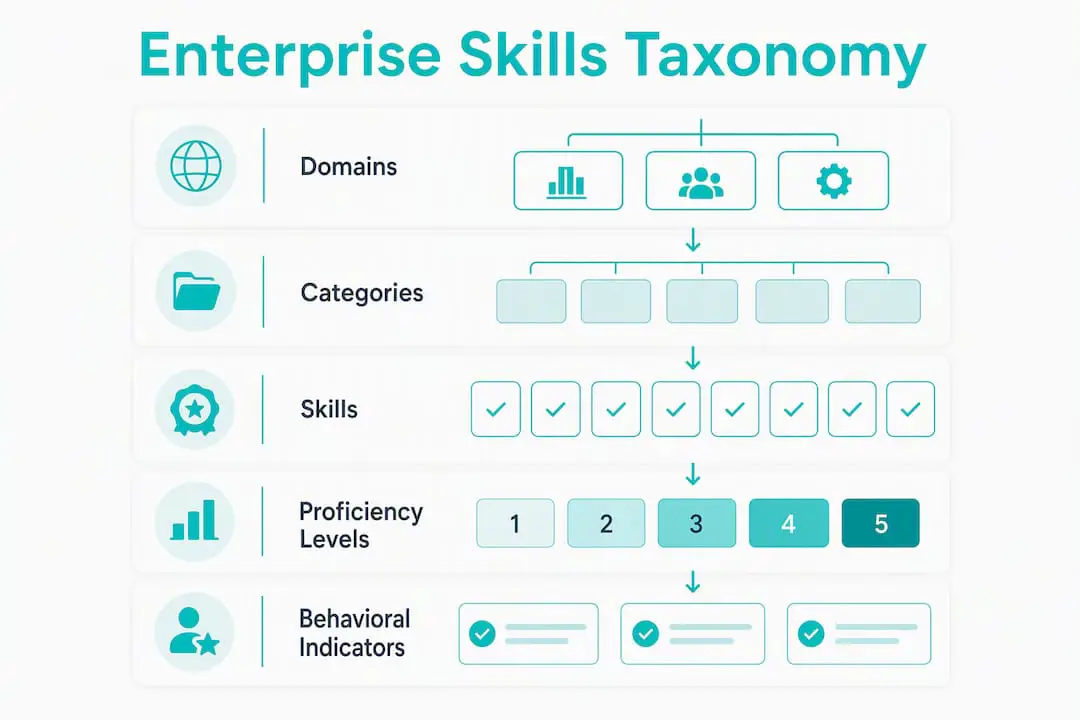
A skills taxonomy is a hierarchical, human- and machine-readable classification of skills organized from broad domains down to specific, assessable skills, with metadata and proficiency levels attached to each node. The structure typically runs three layers deep: Domain → Category → Skill. Each skill record carries synonyms, tags, example tasks, and proficiency definitions so that HR systems, ATS platforms, and assessment tools can all consume the same data consistently.
That structure is what separates a taxonomy from three related concepts HR teams often conflate:
- Taxonomy: A classification with proficiency levels. Used for hiring, assessment, and mobility decisions. The right tool for most enterprise hiring programs.
- Ontology: A complex graph of relationships between skills, roles, and learning paths. Powerful for AI-driven matching but expensive to build and maintain. Most organizations do not need one at launch.
- Skills inventory: A raw list of skills extracted from job descriptions or employee profiles, with no hierarchy or proficiency structure. A useful starting point, not a finished product.
- Skills framework: A benchmarking and assessment tool (like SFIA) that defines expected competencies by role or level. Often used as a foundation to build a taxonomy from, rather than as the taxonomy itself.
The scope decisions you make up front determine how useful the taxonomy becomes. A taxonomy covering 10–20 core skills, with clear proficiency levels, will outperform an exhaustive list of 500 skills with no proficiency guidance. The WEF Global Skills Taxonomy Adoption Toolkit recommends 15–20 categories for broad usability, with Rich Skills Descriptors (machine- and human-readable identifiers) to enable interoperability across HR systems. Start narrow, and let hiring data tell you where to expand.
How does a skills taxonomy improve hiring outcomes?
The direct hiring benefits are concrete. A taxonomy replaces subjective, credential-based screening with standard criteria every recruiter and hiring manager applies the same way. That consistency reduces bias, widens the talent pool by focusing on demonstrated capabilities rather than degree requirements, and makes shortlisting faster because ATS filters can sort candidates by mapped skill and proficiency level rather than keyword matching.
The use cases that deliver the clearest ROI, in priority order:
- Skills-first job postings: Replace vague requirements (“strong communicator”) with taxonomy-mapped skills and proficiency levels (“Data Storytelling — Intermediate: can translate analysis into executive-ready slides”).
- Automated candidate screening: ATS filters on taxonomy IDs surface candidates who meet the minimum proficiency threshold before a recruiter reads a single resume.
- Assessment design: Each assessment is tagged to specific taxonomy nodes, so scores map directly to proficiency levels rather than generic pass/fail outcomes.
- Interviewer scorecards: Behavioral indicators from the taxonomy give interviewers a consistent rubric, reducing inter-rater variability.
- Internal mobility and succession planning: The same taxonomy that drives external hiring also identifies internal candidates ready for lateral or upward moves.
Each benefit ties to a measurable KPI. Time-to-fill drops when skill filters replace manual resume review. Shortlist-to-offer conversion improves when candidates are pre-screened against defined proficiency thresholds. Quality-of-hire proxies, including first-year retention and hiring-manager satisfaction scores, rise when the taxonomy aligns what the role actually requires with what the assessment actually measures.
Prioritize high-volume or mission-critical roles first. Proving ROI on three to five roles in a pilot cohort is far more persuasive to leadership than a theoretical enterprise rollout plan.
What are the core building blocks of an enterprise skills taxonomy?
Hierarchy and metadata
A well-structured taxonomy uses 5–10 top-level domains (e.g., Data & Analytics, Engineering, Customer Success, Operations, Leadership). Each domain contains categories, and each category contains individual skill records. Every skill record should carry: a canonical label, a unique identifier, synonyms and alternate labels, example tasks, source attribution (O*NET element, SFIA code, or internal), and a last-updated date.
The WeSoar Playbook recommends 5–10 top-level domains and 3–5 proficiency levels as the right balance between coverage and usability for most enterprise hiring programs.
Proficiency levels and behavioral indicators
Use four levels as a practical default: Foundation → Intermediate → Advanced → Expert. Each level needs a brief definition and at least one behavioral indicator that an interviewer or assessor can observe directly.
| Level | Definition | Behavioral Indicator Example | Assessment Signal |
|---|---|---|---|
| Foundation | Aware of the skill; can apply it with guidance | Completes a structured SQL query using a provided template | Scores 60–74% on a guided data task |
| Intermediate | Applies the skill independently on standard problems | Writes and debugs a multi-table SQL join without assistance | Scores 75–84% on an unguided data task |
| Advanced | Handles complex, non-standard applications; coaches others | Designs a query optimization strategy for a production database | Scores 85–94%; explains reasoning clearly |
| Expert | Defines standards; resolves novel problems organization-wide | Authors internal SQL style guide; leads performance review process | Scores 95%+; produces reusable artifacts |
Mini-example: Data function hierarchy
Domain: Data & Analytics → Category: Data Engineering → Skill: SQL Query Writing → Proficiency: Foundation / Intermediate / Advanced / Expert (as above)
Pro Tip: Start with a minimal viable taxonomy of 10–20 skills and iterate using hiring data to expand. Practitioners consistently find that over-engineered taxonomies at launch slow adoption and become stale quickly, while a lean starting set gets hiring teams using the taxonomy within weeks.
How do you build an enterprise skills taxonomy in eight steps?
The eight-stage process
- Define goals and use cases. Decide whether the taxonomy will serve hiring only, or also internal mobility and learning. Narrower scope at launch means faster delivery.
- Inventory existing data. Pull current job descriptions, competency frameworks, and training catalogs. This surfaces skills already in use and prevents duplication.
- Select a foundation framework. SFIA works well for technology and IT roles; O*NET provides occupational skill elements mapped to 17 skills categories for U.S.-centric implementations. Using an established framework avoids building from scratch and gives you a defensible, auditable starting point.
- Extract and clean skills. Use NLP tools to extract skill mentions from JDs at scale, then run a subject-matter expert (SME) review to validate, deduplicate, and standardize labels.
- Design hierarchy and proficiency levels. Organize extracted skills into domains and categories, assign proficiency levels, and write behavioral indicators for each level.
- Pilot on 3–5 roles. Create assessments mapped to the taxonomy, run them on live candidates, and collect scoring data to validate that proficiency thresholds predict hiring-manager satisfaction.
- Integrate with ATS and HRIS. Push taxonomy IDs into job posting fields, configure ATS filters, and connect assessment results to candidate records.
- Iterate and scale with governance. Use pilot data to refine proficiency thresholds, add skills where gaps appear, and establish the governance model before expanding to additional roles.
Roles and responsibilities
| Role | Responsibility |
|---|---|
| Taxonomy Owner (HR/Talent Ops) | Maintains the master taxonomy; approves changes; manages publishing pipeline |
| Domain Stewards (Business Unit SMEs) | Validate skill definitions and proficiency indicators for their function |
| HRIS Owner | Manages integration between taxonomy registry and HR systems |
| Assessment SME | Maps assessment items to taxonomy nodes; validates scoring thresholds |
| Hiring Manager Participants | Review pilot scorecards; provide feedback on candidate quality |
| Executive Sponsor | Removes blockers; communicates priority to business units |
The CFA Institute emphasizes that early stakeholder engagement does two things simultaneously: it secures buy-in from the people who will use the taxonomy daily, and it captures the granular, role-specific knowledge that makes skill definitions accurate rather than generic.
Pilot checklist and timeline
8–12 week pilot schedule:
- Weeks 1–2: Stakeholder kickoff, goal definition, existing data inventory
- Weeks 3–4: Framework selection, skill extraction from 20 core roles, SME review
- Weeks 5–6: Hierarchy design, proficiency level writing, behavioral indicator drafting
- Weeks 7–8: Assessment creation and mapping, ATS configuration, recruiter training
- Weeks 9–10: Live pilot on 3–5 roles, data collection, scoring calibration
- Weeks 11–12: Pilot review, go/no-go decision, governance setup, scale planning
Minimum success criteria for go/no-go:
- Consistent scoring across at least 3 hires using the same rubric
- Measurable lift in candidate-to-skill match rate vs. pre-pilot baseline
- Hiring-manager satisfaction score of 4/5 or higher on pilot cohort
Who owns the taxonomy, and how do you keep it current?
Governance is where most enterprise skills taxonomies fail quietly. The taxonomy gets built, adopted for a quarter, and then drifts out of alignment with actual role requirements because no one owns the update process.
A functional governance model has four layers:
- Taxonomy Owner (HR or Talent Operations): holds final authority over the master taxonomy, manages the publishing pipeline into HR systems, and chairs the change review board.
- Domain Stewards (business unit SMEs): submit change requests, validate proposed additions or retirements, and sign off on proficiency indicator updates for their function.
- Change Review Board: meets quarterly to evaluate pending changes, resolve naming conflicts, and approve version releases.
- Publishing Pipeline: a defined workflow that moves approved changes from the registry into ATS, HRIS, and assessment platforms with version stamps and audit logs.
Deloitte’s skills-based organization research makes the case plainly: a taxonomy functions as a hub only when it is the system of record and connects to talent workflows. A taxonomy that lives in a shared drive but does not sync to the ATS is not a system of record.
Recommended update cadence:
- Quarterly lightweight review: Domain stewards flag skills that no longer match open roles or that appear frequently in new JDs but are missing from the taxonomy.
- Annual major review: Full audit of all skill definitions, proficiency levels, and domain structure. Align with strategic workforce planning cycle.
- Event-driven updates: New product lines, acquisitions, or significant technology shifts trigger an out-of-cycle review for affected domains.
Quality controls to prevent drift:
- Require a formal change request for any addition, modification, or retirement of a skill.
- Maintain audit logs with timestamps, requestor, approver, and version number.
- Enforce naming conventions (canonical label + synonym list) to prevent duplicate skills entering under different labels.
- Archive retired skills rather than deleting them, so historical hiring data remains interpretable.
What should you look for in tools, and how do you integrate the taxonomy into your hiring stack?
The taxonomy only changes hiring decisions when it lives inside the systems recruiters and hiring managers actually use. A taxonomy stored in a spreadsheet, disconnected from the ATS and assessment platform, cannot automate tagging or candidate filtering. ClearCompany’s practitioner guidance documents this as one of the most common failure modes: integration with assessment tools automates skill tagging and candidate filtering, improving ranking accuracy in ways that manual processes cannot replicate.
Vendor capabilities to evaluate:
- API-first taxonomy storage with versioned endpoints
- Skill extraction and NLP for bulk JD parsing
- Bulk mapping tools to tag existing job postings retroactively
- Assessment mapping features that link test items to taxonomy IDs
- Audit logs and change history at the skill level
- Multi-tenant support if multiple business units manage separate domains
Integration priority order:
- ATS first: Embed taxonomy IDs in job posting fields; configure skill-based candidate filters; surface proficiency requirements on job cards.
- Assessment platform second: Tag every assessment item to a taxonomy node; configure auto-scoring rules that map scores to proficiency levels; feed results back to the ATS candidate record.
- HRIS third: Sync employee skill profiles for internal mobility matching and workforce planning analytics.
- L&D systems last: Map skill gaps identified in hiring to learning content for onboarding and development planning.
Recommended data model for machine readability:
Each skill record should carry a unique identifier (not just a label), a canonical name, a synonym list, a source field (O*NET element ID, SFIA code, or internal), a last-updated timestamp, and a proficiency-level array. Rich Skills Descriptors, as recommended by the WEF toolkit, provide a cross-system interoperability standard worth adopting if your organization uses multiple HR platforms.
The architecture that works at scale: a single taxonomy registry as the source of truth, with push/sync connections to ATS and assessment platforms, and a middleware layer for real-time skill tagging on inbound applications.
How do you use the taxonomy in day-to-day hiring?
The taxonomy’s value shows up in four concrete artifacts that recruiters and hiring managers use on every role.
-
Skills-first job description template. Structure JDs with three fields: Core Skills (required, with proficiency level), Preferred Skills (nice-to-have, with proficiency level), and Context (team, tools, and environment). Require recruiters to map each JD to at least three taxonomy nodes before posting. This single change standardizes language across business units and makes ATS filtering possible. For a practical walkthrough of skills-based hiring processes, the operational steps translate directly to taxonomy-driven workflows.
-
Interview scorecard with behavioral indicators. Each scorecard row maps to a taxonomy skill and proficiency level. The behavioral indicator column tells the interviewer exactly what to look for. A pass threshold (e.g., must score Intermediate or above on all Core Skills) makes the decision criteria explicit before the interview starts, not after.
-
Assessment mapping. Each assessment question or test module is tagged to a taxonomy node and scored against a proficiency threshold. A candidate who scores in the Intermediate band on SQL Query Writing gets that result written back to their ATS record as a taxonomy-mapped data point, not just a percentage score. Talent Approved’s candidate ranking feature automates this step, ranking candidates by their mapped skill scores so recruiters see the strongest matches first.
-
Operational rules for consistency. Embed taxonomy IDs in ATS job fields (not just free-text labels). Require at least three mapped skills per role before a requisition goes live. Train interviewers on interpreting proficiency indicators during a 30-minute calibration session before the first interview cycle on any new role.
What metrics prove the taxonomy is improving hiring outcomes?
Baseline three to six months of pre-pilot data on your prioritized roles before the pilot starts. Without a baseline, you cannot demonstrate improvement.
Core metrics to track:
- Time-to-fill for taxonomy-piloted roles vs. matched control roles
- Shortlist-to-offer conversion rate before and after taxonomy integration
- Quality-of-hire proxies: first-year retention rate, 90-day performance rating, hiring-manager satisfaction score (1–5 scale)
- Assessment pass rate by candidate source: shows which sourcing channels produce candidates who meet proficiency thresholds
- Internal mobility rate: percentage of open roles filled by internal candidates identified through the taxonomy
For KPI selection and baseline methodology, enterprise hiring ROI measurement frameworks provide a finance-ready structure that maps directly to these metrics.
Dashboard design:
Build a single-pane hiring dashboard with filters for role, business unit, and skill domain. Include trend lines for each core metric and cohort comparisons between pilot and control groups. The BLS skills data product, which maps occupational projections to 17 skills categories tied to O*NET elements, is a useful external benchmark for U.S. roles, particularly for workforce planning and gap analysis.
Data governance for measurement integrity:
- Tag every hire, assessment result, and job posting with the taxonomy version active at that time.
- Require consistent skill tagging across ATS, assessment platform, and HRIS to prevent measurement drift.
- Review tagging consistency quarterly as part of the governance cadence.
What causes skills taxonomies to fail, and how do you prevent it?
Most taxonomy projects fail for the same five reasons, and each has a direct fix.
- Over-engineering at launch. Teams try to classify every skill in the organization before anyone uses the taxonomy. Fix: start with 10–20 skills for 3–5 roles, prove the model, then expand. The CFA Institute’s practitioner guidance consistently points to iterative expansion as the approach that sustains adoption.
- Fragmented ownership. Multiple teams maintain separate skill lists with no central authority. Fix: assign a taxonomy owner with explicit authority to approve changes before they enter any system.
- Disconnected spreadsheets. The taxonomy lives in a shared Excel file that no system reads. Fix: move to a taxonomy registry with API connections to ATS and assessment platforms from day one of the pilot.
- No assessment mapping. Skills are defined but no assessment measures them. Fix: require every skill in the taxonomy to have at least one mapped assessment item before the skill goes live in hiring workflows.
- Poor change control. Skills get renamed or redefined informally, breaking historical comparisons. Fix: enforce the change request process from the first day of governance, even during the pilot.
30/60/90-day corrective playbook if adoption stalls:
- Day 30: Identify the two or three roles where recruiters are not using skill filters. Run a 30-minute training session with those specific teams. Collect one piece of feedback on what is making the taxonomy hard to use.
- Day 60: Deliver a quick-win report to the executive sponsor showing time-to-fill and shortlist quality data from roles where the taxonomy is being used. Use the contrast to re-engage lagging teams.
- Day 90: Executive sponsor check-in with business unit leaders. Frame the taxonomy as a hiring efficiency tool, not an HR compliance exercise. Tie adoption to a metric the business unit already tracks.
Mini taxonomy example, implementation checklist, and cost considerations
12-skill taxonomy snippet across three domains
| Domain | Skill | Proficiency Marker (Intermediate) | Metadata |
|---|---|---|---|
| Data & Analytics | SQL Query Writing | Writes multi-table joins without assistance | Source: O*NET |
| Data & Analytics | Data Visualization | Builds executive dashboards in Tableau or Power BI | Source: Internal |
| Data & Analytics | Statistical Analysis | Applies regression models to business problems | Source: O*NET |
| Engineering | API Design | Documents and versions REST APIs independently | Source: SFIA |
| Engineering | Code Review | Identifies logic errors and suggests refactors | Source: Internal |
| Engineering | CI/CD Pipeline Management | Configures and maintains a deployment pipeline | Source: SFIA |
| Customer Success | Stakeholder Communication | Presents project updates to non-technical audiences | Source: Internal |
| Customer Success | Conflict Resolution | De-escalates client issues without escalation | Source: O*NET |
| Customer Success | Product Knowledge Application | Maps product features to specific customer outcomes | Source: Internal |
| Leadership | Coaching and Feedback | Delivers structured feedback tied to performance goals | Source: Internal |
| Leadership | Decision Making Under Ambiguity | Makes defensible decisions with incomplete data | Source: Internal |
| Leadership | Cross-functional Collaboration | Coordinates deliverables across three or more teams | Source: Internal |
Implementation checklist
- Discovery: audit existing JDs, competency frameworks, and training catalogs
- Stakeholder workshops: validate skill lists with domain SMEs and hiring managers
- Skill extraction: run NLP parsing on JDs; SME review to deduplicate and standardize
- SME validation: sign-off on proficiency definitions and behavioral indicators
- Assessment creation: map at least one assessment item per skill; set scoring thresholds
- Pilot integration: push taxonomy IDs into ATS job fields; configure candidate filters
- Measurement: capture baseline metrics; set up pilot dashboard
- Governance setup: assign taxonomy owner and domain stewards; document change request process
Cost considerations
Internal costs dominate most pilots. Budget for:
- Internal FTE hours: taxonomy owner (part-time, 8–12 weeks), domain stewards (2–4 hours per workshop), HRIS owner (integration configuration), assessment SMEs (item writing and validation).
- External tooling and integration: taxonomy registry software or HRIS configuration, ATS custom field setup, middleware if real-time tagging is required. Costs vary significantly by existing stack and vendor.
- Assessment creation: manual item writing runs higher in time cost; AI-assisted generation (as offered by platforms like Talent Approved) reduces per-assessment creation time substantially. Per-candidate assessment fees vary by platform and volume.
Plan for a larger investment in the governance and integration phases than in the initial build. The taxonomy itself is relatively fast to create; making it actionable inside your hiring stack takes longer.
How do you design proficiency indicators and map assessments to taxonomy skills?
Valid, reliable assessment artifacts are what separate a taxonomy that influences hiring from one that sits in a document no one reads.
Assessment blueprint by item type
Map item types to the proficiency level they can reliably measure:
- Foundation: Multiple-choice and short-answer questions testing recall and basic application. Acceptable threshold: 60–74% correct.
- Intermediate: Unguided tasks (write a query, draft a response, solve a case) that require independent application. Threshold: 75–84%.
- Advanced: Simulation or scenario-based items requiring judgment and explanation of reasoning. Threshold: 85–94%.
- Expert: Open-ended design or audit tasks where the candidate produces a reusable artifact. Threshold: 95%+.
For a detailed breakdown of technical assessment formats by item type and role, the format guide maps directly to these proficiency tiers.
Behavioral indicator templates
Write indicators in observable, third-person language so interviewers and assessors apply them consistently:
- Foundation: “Candidate completes [task] using a provided template or with direct guidance.”
- Intermediate: “Candidate completes [task] independently and explains their approach when asked.”
- Advanced: “Candidate identifies edge cases in [task], adjusts their approach, and articulates trade-offs.”
- Expert: “Candidate produces a reusable artifact for [task] and identifies systemic improvements beyond the immediate problem.”
Mapping workflow
Tag each assessment item to a taxonomy ID at creation. Set auto-score rules that map score bands to proficiency levels. Define three outcome tiers: Pass (meets minimum proficiency for the role), Shortlist (exceeds minimum; fast-track to interview), and Fast-Track (Expert-level signals; flag for senior hiring manager review). Write results back to the ATS candidate record using the taxonomy ID, not just a raw score.
Pro Tip: Use AI-assisted item generation to scale assessment creation without sacrificing validity. Talent Approved’s Magic Create feature generates role-specific assessments from a job description in minutes, with each item mappable to taxonomy skills. This cuts assessment creation time from days to hours during a pilot, and the built-in anti-cheat tools and AI-generated candidate summaries make review faster too.
Key Takeaways
An enterprise skills taxonomy delivers consistent, skills-based hires only when it combines a lean hierarchy, defined proficiency levels, ATS integration, and a governed update process from day one.
| Point | Details |
|---|---|
| Start with a minimal viable taxonomy | Build 10–20 core skills with 3–5 proficiency levels before expanding; over-engineering at launch slows adoption. |
| Integrate into ATS and assessments first | A taxonomy stored in a spreadsheet cannot automate filtering or ranking; ATS and assessment integration is the priority. |
| Assign a taxonomy owner from day one | Fragmented ownership is the leading cause of taxonomy drift; one named owner with change authority prevents it. |
| Measure against a pre-pilot baseline | Capture 3–6 months of time-to-fill and quality-of-hire data before the pilot so improvement is demonstrable. |
| Talent Approved accelerates pilots | Talent Approved generates taxonomy-mapped assessments from job descriptions and ranks candidates by skill score, reducing pilot setup time significantly. |
The part of skills taxonomy projects most teams underestimate
Most HR teams spend the majority of their taxonomy budget on the build phase: workshops, skill extraction, hierarchy design, proficiency writing. That work matters. But the build is not where taxonomies succeed or fail. They succeed or fail in the 90 days after the pilot goes live, when the governance model either holds or quietly dissolves.
The pattern is consistent: a taxonomy gets built with genuine care, piloted on a handful of roles, and then handed off to a team that has no clear owner, no update process, and no mechanism to catch when a skill definition drifts out of alignment with what the business actually needs. Six months later, recruiters stop using the skill filters because the results feel off. Hiring managers stop trusting the scorecards because the behavioral indicators no longer match the role. The taxonomy becomes another artifact in a shared drive.
The fix is not more documentation. It is treating the taxonomy as a product with a product owner, a release cadence, and user feedback loops. Domain stewards are not administrators; they are the people closest to the work, and their quarterly input is what keeps the taxonomy accurate. Protect their time for that function.
Where to invest first, if resources are limited: taxonomy storage and ATS integration before anything else. A taxonomy that lives inside the ATS, even imperfectly, changes hiring behavior. A taxonomy that lives outside it does not. Assessment automation is the second investment, because it is the mechanism that turns taxonomy labels into candidate data. Everything else, including L&D integration and advanced analytics, can follow once the hiring loop is working.
Treat the taxonomy as a living product. Version it, measure it, and iterate on it the same way a product team iterates on software. The organizations that do this consistently end up with a hiring asset that compounds in value over time.
How Talent Approved helps you run a skills taxonomy pilot faster
Cutting assessment creation time is usually the biggest bottleneck in a taxonomy pilot. Writing, validating, and tagging assessment items manually for even five roles can take weeks, and that delay pushes the entire pilot timeline back.
Talent Approved is built to close that gap. The Magic Create feature generates role-specific skill assessments from a job description in minutes, with each item ready to map to your taxonomy IDs. There is no subscription required: you pay $5 per completed candidate assessment, which makes it straightforward to budget a pilot without committing to a platform contract before you have results.
The platform’s candidate ranking automatically scores and orders candidates by their assessment results, so your recruiters see the strongest taxonomy-matched candidates first. Built-in anti-cheat tools with screen and webcam monitoring protect the integrity of your pilot data, and AI-generated performance summaries let hiring managers review candidates in a fraction of the time manual review takes.
To evaluate whether it fits your stack: run a two-role pilot using Talent Approved’s AI test generator and compare the time and consistency of results against your current manual process. The comparison will tell you quickly whether AI-assisted assessment creation belongs in your enterprise taxonomy workflow.
Useful sources for implementation
- O*NET / BLS Skills Data Product: The BLS Employment Projections program maps occupational projections to 17 skills categories tied to O*NET elements. Best for U.S.-centric implementations; use it to baseline skills by occupation and validate taxonomy coverage against labor market data.
- SFIA — Skills Framework for the Information Age: The most widely used foundation framework for technology and IT roles. Provides pre-built skill definitions and proficiency levels you can adopt directly or adapt for your taxonomy. Best for organizations with large engineering or IT functions.
- WEF Global Skills Taxonomy Adoption Toolkit (2025): Practical guidance on granularity decisions, Rich Skills Descriptors, and cross-system interoperability. Best for global implementations or organizations that need their taxonomy to connect with external labor market data.
- CFA Institute: Building an Effective Skills Taxonomy: Five practitioner rules covering stakeholder engagement, iterative build approach, and governance. Sector-agnostic and directly applicable to enterprise HR programs.
- Deloitte: Skills-Based Organization and Skills Frameworks: Makes the case for taxonomy-as-system-of-record and covers integration with HRIS and talent workflows. Best for organizations building the business case for executive sponsorship.
- 365Talents: Comprehensive Guide to Skills Taxonomy: A six-step how-to covering objective alignment, skill identification, grouping, proficiency definition, role mapping, and technology integration. Useful as a process checklist alongside the build steps in this guide.
- Fuel50: A talent marketplace platform that uses skills taxonomies to power internal mobility and career pathing. Relevant for organizations extending their taxonomy beyond hiring into workforce development.
FAQ
What is the difference between a skills taxonomy and a skills framework?
A skills taxonomy classifies skills hierarchically with proficiency levels for consistent assessment; a skills framework (like SFIA) defines expected competencies by role or level and is often used as a foundation to build a taxonomy from.
How many skills should an enterprise taxonomy include at launch?
Start with 10–20 core skills across your highest-priority roles. Practitioners and the CFA Institute both recommend iterative expansion over exhaustive launch lists, which slow adoption and become outdated quickly.
How long does it take to build and pilot a skills taxonomy?
An 8–12 week pilot covering 3–5 roles is achievable for most enterprise HR teams, covering skill extraction, proficiency definition, assessment creation, ATS integration, and initial measurement.
Can Talent Approved generate assessments mapped to a skills taxonomy?
Yes. Talent Approved’s Magic Create feature generates role-specific assessments from job descriptions in minutes, and each assessment item can be tagged to taxonomy IDs for automated candidate ranking and proficiency scoring.
What is the most common reason skills taxonomies fail?
Fragmented ownership and lack of ATS integration are the two leading causes. A taxonomy without a named owner drifts out of alignment; a taxonomy disconnected from the ATS cannot automate filtering or influence hiring decisions at scale.