
Deploy Question Randomization Tests in Minutes for Educators

Question randomization tests present a different question order, answer sequence, or item set to each student, so copying an answer key or peeking at a neighbor’s screen stops working. The main payoff is fewer opportunities for unpermitted sharing, but the technique only stays fair when the underlying question pools are built with equivalent difficulty and enough depth to avoid repeats.
TL;DR:
- Randomization works best when question pools are deep and well-balanced, with at least 100 to 200 items per 10 questions to minimize overlaps.
- Combining multiple randomization techniques significantly raises cheating difficulty, especially when questions, answer options, and delivery are varied simultaneously.
- Proper setup involves tagging questions by outcome and difficulty, previewing with seeds, and maintaining detailed records of which version each student receives.
- Using many small sub-pools with a low question-to-pool ratio is proven to reduce overlaps and sequential repeats across large classes.
- Automated assessments like Talent Approved streamline randomization and anti-cheat measures, notably reducing setup time while ensuring fairness and security.
Table of Contents
- What Question Randomization Is and Why It Matters
- Types and Techniques of Question Randomization
- How to Set Up Randomization in an LMS or Assessment Workflow
- Design Best Practices to Keep Randomized Tests Fair
- Implementation Checklist: Settings, Metadata, and Run-Day Checks
- Limits of Randomization and Complementary Integrity Tools
- Build Randomized, Role-Specific Tests Without the Manual Setup Work
- Author Perspective: What Actually Moves the Needle
- Sources
- FAQ
What Question Randomization Is and Why It Matters
Question randomization covers two related moves: shuffling the order in which items appear, and pulling questions from a larger pool so different students see different subsets entirely. The first protects against someone glancing at a neighbor’s screen and matching answer position to answer position. The second, often called randomly selected question exams (RSQE), protects against a student who took the test yesterday texting the answers to a friend taking it today.
Institutions lean on this for three practical reasons:
- Remote and online testing removed the physical control a proctor used to have over a room.
- Automated grading systems need structured items, so randomization scales without adding manual review work.
- Large course sections reuse the same item bank across sittings, and randomization keeps that reuse from becoming a leak.
Randomization is not a replacement for proctoring or plagiarism detection. It is a structural layer that makes those other tools more effective by shrinking the payoff for cheating in the first place.
Types and Techniques of Question Randomization
Four techniques cover most of what educators need, and they stack.
- Shuffle question order. The same set of items appears in a different sequence for each student, which defeats simple “compare answer positions” cheating.
- Shuffle answer options. Within a multiple-choice item, the choices themselves rotate, so “the answer is C” stops being useful information to share.
- Random selection from sub-pools. Instead of every student getting the same 40 questions, each student draws a handful from dozens of equivalent sub-pools, so no two tests look alike.
- One-question-at-a-time delivery. Students see and answer one item before the next appears, which prevents scanning the whole exam and coordinating answers in real time.
Combining all four raises the cost of cheating dramatically, because a student would need to coordinate not just answers but positions, wording, and pacing with someone taking a genuinely different test. One caveat: some items should not shuffle. If an option like “None of the above” always sits last, locking that position while shuffling the rest keeps the item logically sound.
Pro Tip: Run a shuffled quiz in preview mode before publishing it. Fixed-answer options that got scrambled accidentally are the single most common randomization bug educators report after launch.
How to Set Up Randomization in an LMS or Assessment Workflow
Most learning management systems and survey platforms already have the controls you need. The work is less about finding a hidden setting and more about organizing your content so those settings behave predictably.
- Build labeled item banks. Group questions by topic and difficulty, and tag each one to the learning outcome it measures, so a random draw still covers the right material.
- Set draw rules. Configure “draw X questions from this pool” per section rather than pulling from one giant bank, and turn on answer-choice shuffling where it makes sense.
- Preview with a seed. Platforms like Qualtrics document randomize-block features that let you generate a test draw and confirm the output before students see it.
- Lock what needs locking. Fixed-position answers and any accommodation-related settings (extended time, screen readers) need to survive the shuffle untouched.
- Export the mapping. Keep a record of which seed or draw produced which version, so grading and appeals reference the exact test a student took.
Item banks in Canvas and similar systems are built for exactly this workflow, generating a distinct subset per student from one shared bank. A Monte Carlo study of RSQE design found that the number of sub-pools and the draw ratio directly determine how often two students end up with overlapping questions, which is why the next section covers pool depth in detail.
Design Best Practices to Keep Randomized Tests Fair
Randomization only works if the pools it draws from are built well. A shallow pool with five items per sub-pool will repeat questions constantly across a large class, no matter how good the shuffle algorithm is.
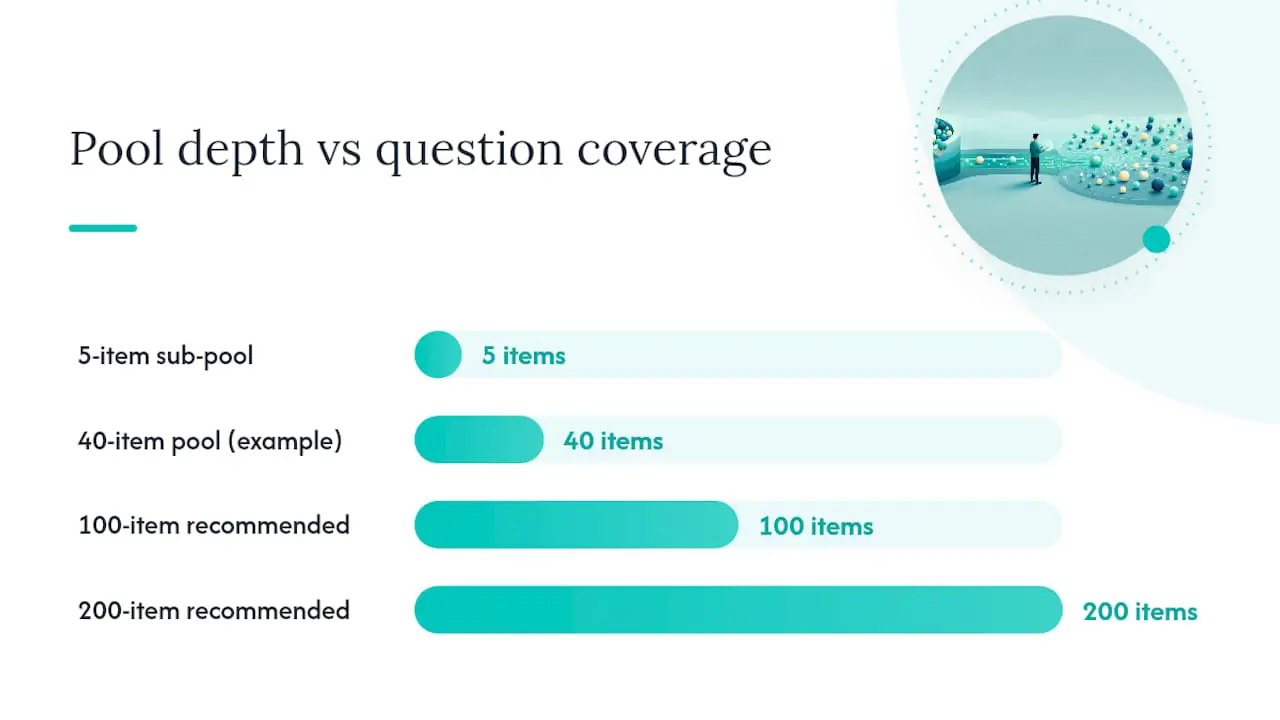
The strongest evidence on this comes from a 2022 Monte Carlo analysis of 600 randomly selected question exams, which found that using many sub-pools with a low question-to-pool ratio, in the 5 to 10 percent range, sharply cuts down on repeated and sequential-overlap questions between students. In practice, that means a 10-question exam works better pulling from 100 to 200 sub-pool items than from 40.
Depth alone is not enough. A few other rules matter just as much:
- Every item within a sub-pool should test the same learning outcome at roughly the same difficulty, so no student draws an easier or harder version by chance.
- Retire and replenish pools after each testing window, especially for high-enrollment courses where the same exam runs across multiple sections or semesters.
- If you generate items from templates, run a difficulty check, historical performance data or a simulated item response theory (IRT) draw, before adding the new item to a live pool.
Historical experiments on randomized multiple-choice exams have generally found no measurable drop in average performance when items are properly calibrated for difficulty. That finding depends entirely on doing the calibration work first.
Implementation Checklist: Settings, Metadata, and Run-Day Checks
Treat rollout as three phases, not one big configuration session.
- Before the exam: Tag every item by topic, difficulty, and outcome. Build sub-pools with a low draw ratio. Run a pilot preview and confirm fixed-answer positions survive the shuffle.
- During the exam: Monitor session logs as students work through the test, and confirm that accessibility accommodations, extended time, screen reader compatibility, carried through the randomization settings without being overridden.
- After the exam: Export the full seed-to-student mapping so you can reconstruct exactly which version each student received. Run a basic answer-pattern scan across submissions, and log fairness metrics for review.
Pro Tip: Store the seed-to-student mapping the same day you administer the exam, not when a regrade request comes in three weeks later. Reconstructing which version a student took gets harder the longer you wait.
Teams managing large cohorts often fold this checklist into a broader high-volume assessment workflow so the run-day steps become routine rather than a one-off scramble each testing cycle.
Limits of Randomization and Complementary Integrity Tools
Randomization narrows the opportunity for cheating. It does not detect it after the fact, and it does not guarantee every version of the test is equally hard.
- Statistical detection still matters. A randomization p-value test can flag suspiciously similar answer patterns between students even when the questions themselves were shuffled or drawn from different sub-pools.
- Pair it with proctoring and logs. Session recordings and timestamped activity logs catch behavior that randomization alone cannot, like a browser tab switch mid-exam.
- Check fairness with IRT. A University of Illinois analysis using item response theory simulations across 100 permutations and 500 runs per student found that most randomized-pool exams were reasonably fair, using metrics like mean absolute deviation to flag when a particular pool draw skews too easy or too hard.
When a fairness check flags a problem, the fix is usually redesigning the sub-pool, not abandoning randomization altogether.
Build Randomized, Role-Specific Tests Without the Manual Setup Work
Everything covered above, tagging items, building sub-pools, locking fixed answers, tracking which version each person received, takes real hours to configure by hand. Talent Approved cuts that setup down to minutes. Its Magic Create feature builds a role-specific skill assessment straight from a job description or a list of skills, then draws on reusable question libraries so you are not starting from a blank pool every time you hire.

The platform’s anti-cheat layer, screen and webcam monitoring, session replays, and full seed mapping, handles the operational side of the checklist automatically, and AI-generated summaries mean you are not manually reviewing every candidate’s raw responses to judge fairness or flag anomalies. Because Talent Approved charges $5 per completed candidate assessment with no subscription, teams running high-volume hiring rounds get the same randomized, secure testing infrastructure described in this guide without paying for software they use twice a year. Start building an assessment and see how quickly a job description turns into a live, tamper-resistant test.
Author Perspective: What Actually Moves the Needle
Most teams over-invest in shuffle settings and under-invest in pool depth. A wide sub-pool with a low draw ratio does more for fairness than any shuffling toggle. Start high-stakes assessments with more sub-pools than feels necessary, pilot them, and let post-exam fairness data, not intuition, tell you where the pools are too thin.
— Jimmie
Sources
- Shuffling questions and answer options in Canvas quizzes
- Practical randomly selected question exam design to address replicated and sequential questions in online examinations
- Are we fair? Quantifying score impacts of computer science exams with randomized question pools
FAQ
What Is a Randomization Test?
In assessment design, a randomization test refers to presenting different question orders, answer sequences, or item sets to each test-taker, often paired with a statistical randomization p-value test used afterward to detect suspicious answer-pattern similarity between students.
What Does It Mean for a Question to Be Randomized?
A randomized question either appears in a different position for each test-taker, has its answer choices shuffled, or is drawn from a pool of equivalent items so different students may not even see the same question at all.
What Are the Five Types of Test Questions Most Often Randomized?
Multiple-choice, true/false, matching, fill-in-the-blank, and short-answer items are all commonly randomized, though multiple-choice sees the most sophisticated treatment since both question order and answer-option order can shuffle independently.
How Do I Randomize Questions Without Making the Test Unfair?
Use many sub-pools with a low question-to-pool ratio, generally 5 to 10 percent, and confirm every item in a sub-pool tests the same outcome at similar difficulty before it goes live.
Can Talent Approved Randomize Assessment Questions Automatically?
Yes. Talent Approved’s reusable question libraries and Magic Create feature let recruiters build role-specific assessments with randomized item selection and built-in anti-cheat monitoring, without manually configuring pools from scratch.